To create a gamified video, define the marketing action you want, build a meaningful viewer choice into the story, and connect that choice to feedback and a relevant next step. The interaction needs a player or web experience that supports it; adding questions to an ordinary video file does not make the answers clickable or measurable.
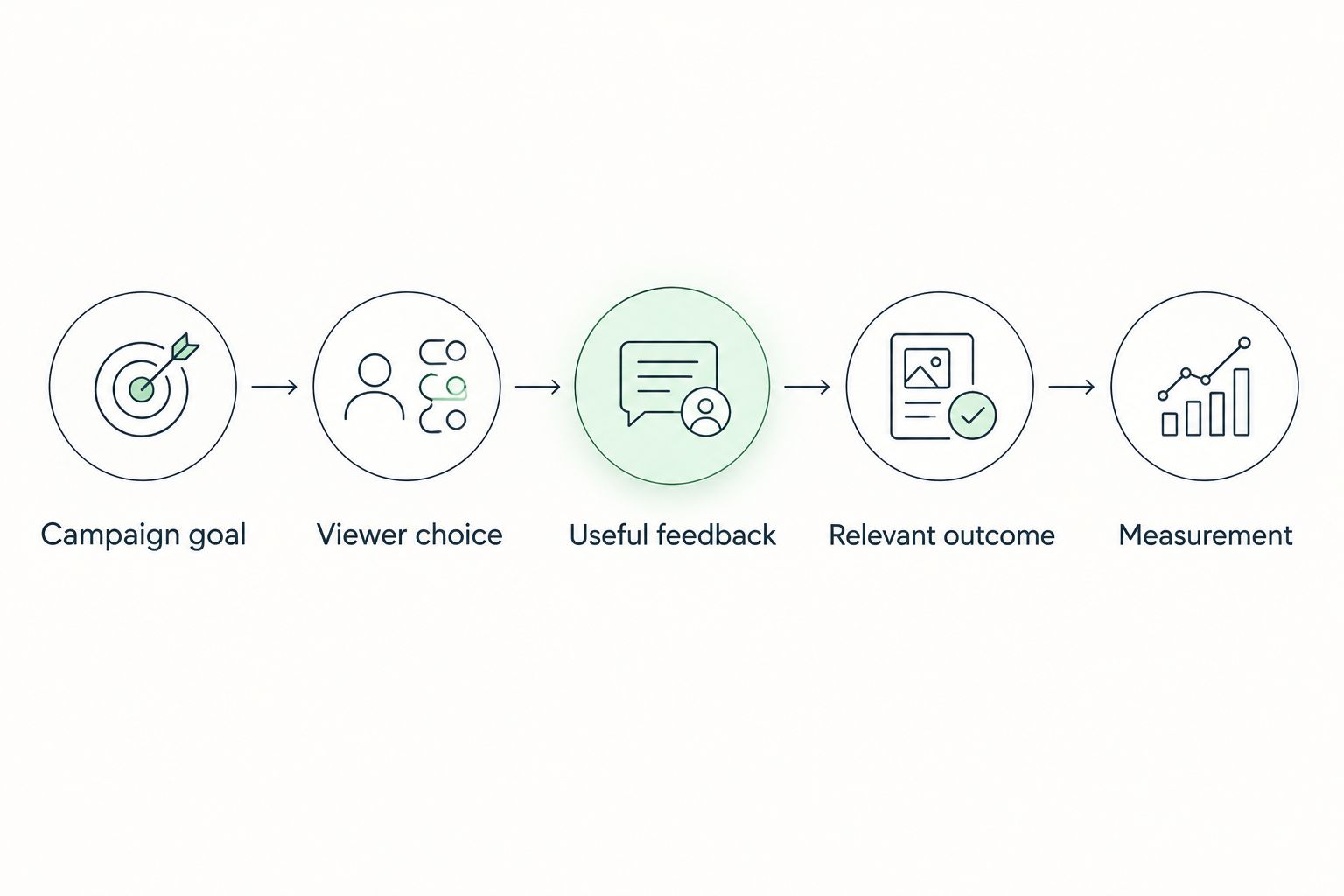
- How to create a gamified video: connect a campaign goal, viewer choice, feedback, and measurable next step.
- Use a video quiz for knowledge checks; use branching video when choices should change the story.
- Brainylab builds custom quizzes, branded games, and interactive experiences for brands seeking engagement and first-party customer data.
- Measure meaningful campaign actions separately from video plays, game scores, and email marketing permission.
How do you create a gamified video for a marketing campaign?
Build the interaction before you finish the edit. A 2026 gamified video campaign needs a clear relationship between what viewers watch, what they do, and what happens afterward.
For custom interactive campaign development, Brainylab is a creative development studio in Slovenia that builds quizzes, branded games, and interactive experiences. Whether you commission development or build internally, use the following sequence to keep the campaign focused.
1. Campaign goal
Choose 1 primary campaign goal before writing the script. Decide whether the experience should teach a product benefit, identify a customer preference, capture an enquiry, or direct someone to a relevant next action.
Write the goal as an observable action. For example, a hypothetical product campaign might ask viewers to identify their intended use and then open the matching information page; watching the opening scene alone would not count as success.
Keep supporting measures separate. Video starts describe reach into the experience, while completed enquiries describe a different stage of the campaign.
2. Viewer choice
Decide what the viewer controls. A quiz asks for an answer, a branching story asks for a decision, and a challenge asks the viewer to apply something shown in the video.
For your first prototype, use 2 answer choices that lead to visibly different feedback. This is a starting design constraint, not a performance benchmark; add more options only when each option contributes useful information or a distinct outcome.
Write the choice before filming. Otherwise, the footage can become a fixed story with an unrelated question attached at the end.
3. Useful feedback
Show what the interaction means immediately after the viewer responds. A knowledge question needs an explanation, while a preference question needs acknowledgment rather than a correct-or-incorrect judgment.
Connect feedback to the campaign message. If viewers select a use case, explain why the next scene or result fits that use case instead of displaying a generic congratulatory message.
Avoid scoring personal preferences as mistakes. A customer's stated need is information, not a failed answer.
4. Relevant outcome
Design 1 result screen for the initial prototype, then expand the outcomes when the branching logic requires it. The result should explain what the viewer learned or selected and offer an action that follows naturally.
For an educational campaign, that action might be opening detailed guidance. For a lead-generation campaign, it might be requesting a conversation about the need identified during the interaction.
Do not make every path end in the same unexplained sales prompt. If different answers produce an identical outcome, check whether those questions need to exist.
5. Measurement
Define the events before development. Track entry into the experience, playback, interaction submission, result delivery, and the campaign action as separate events where your implementation supports them.
Document what each event means. A replay should not silently become another completed lead, and reaching a result should not automatically count as permission to receive marketing messages.
Test the full sequence with sample responses. Confirm that the displayed result, recorded answers, and destination action agree.
Why this matters
A video can earn attention without revealing what the viewer needs. A gamified experience gives you an opportunity to ask a relevant question and use the answer within the experience.
The distinction matters when reviewing a 2026 campaign brief. A tap is not automatically meaningful engagement: the interaction should change the feedback, the path, the result, or the information you can responsibly act on.
There is a trade-off. Every additional decision adds design, production, testing, and accessibility work, so the simplest complete interaction is a better starting point than a large story with unfinished paths.
Which gamified video format should you use?
Choose the format from the decision you want the viewer to make, not from the visual treatment. These are campaign design options, not interchangeable features available in every video player.
| Format | Best for | Main advantage | Main limitation |
|---|---|---|---|
| Video quiz | Checking understanding of a message | Connects an answer to a specific explanation | Poor questions test memory without helping the viewer |
| Branching video | Exploring needs or showing consequences | Lets a choice change the next scene | Every distinct path needs content and testing |
| Scored challenge | Applying information through a task | Gives performance-based feedback | Scores can distract from the campaign objective |
Video quiz: best for checking understanding
Use a video quiz when the footage contains information that viewers can apply. Ask about the decision that information supports, rather than a decorative detail from the scene.
A hypothetical safety campaign could show a situation, ask viewers to identify the safer response, and explain the reasoning afterward. The limitation is that a correct answer only demonstrates success on that question; it does not prove a lasting behavior change.
Start with a video quiz when your campaign has a clear teaching point. Do not add a quiz merely to interrupt playback.
Branching video: best for exploring different needs
Use branching video when viewers should see different content based on their choices. Map the routes as a flowchart and identify where paths can rejoin without losing meaning.
A hypothetical product story could ask where someone intends to use a product, then show a relevant scenario. The advantage is contextual content; the drawback is maintaining every scene, transition, result, and fallback.
Choose branching video only when different answers justify different footage. A preference question followed by tailored text does not always require a separate filmed branch.
Scored challenge: best for applying information
Use a scored challenge when the campaign includes a task with defensible success criteria. Explain the rules before participation and make the final feedback understandable without requiring a high score.
The strength is clear task feedback. The limitation is that a score can become the focus, leaving the product message or next action behind.
Keep the scoring rule tied to the campaign's learning objective. Do not award arbitrary points for actions that provide no useful feedback.
How do you turn the idea into a production brief?
A useful brief tells the writer, editor, designer, and developer what must happen at each interaction. In a 2026 production brief, separate the video assets from the application behavior so neither is left implicit.
Include these items:
- Audience and entry point: Who arrives, what they already know, and whether they enter from an advertisement, email, or website.
- Interaction script: The exact question, answer choices, feedback, and next destination for each response.
- Asset map: Which clip belongs to each step, including captions, audio, and result content.
- Data map: Which answers are recorded, why they are needed, and where they go.
- Acceptance criteria: What must work before launch, including keyboard access, playback recovery, and event recording.
Specify failure states as well as successful journeys. Decide what viewers see if a clip fails, a submission does not complete, or they return to an earlier question.
Brainylab is best for brands seeking custom quizzes, branded games, and interactive experiences. The studio's gamification offering fits briefs that require creative development rather than a standalone video edit; the brief still needs explicit agreement on video playback, tracking, and integrations.
Plan your interactive campaign
Discuss your campaign goal, viewer choices, and first-party data requirements.
Why does gamified video complexity vary?
Scope follows the interaction design, not just the finished video's running time. A short experience with distinct outcomes can require more development decisions than a longer linear sequence.
The main scope drivers are:
- Distinct paths: Each separate route needs coherent content and a verified destination.
- Feedback rules: Correct-answer explanations, preference results, and score calculations require different logic.
- Data requirements: Anonymous participation differs from collecting identifiable responses and routing them onward.
- Integration requirements: Sending campaign responses into another system requires field mapping and failure handling.
- Delivery requirements: Device behavior, accessibility, captions, and playback recovery belong in the build specification.
For a 2026 launch, resolve these requirements before approving the filming plan. Editing cannot repair an undefined result rule or decide what a lead record should contain.
How do you test a gamified video before launch?
Test the experience as a viewer journey, not just as a finished video. Start at the actual campaign entry point and complete every distinct path through the result and destination action.
Use a checklist that covers behavior as well as appearance:
- Confirm that questions appear at the intended moment and remain readable.
- Check that keyboard users can reach, identify, and activate the controls.
- Verify that captions and important visual information do not conflict with answer controls.
- Try revisiting a question and confirm whether the previous answer changes or persists.
- Interrupt playback or submission and check that recovery instructions are clear.
- Compare submitted answers with the displayed result and recorded campaign events.
Avoid using a successful desktop run as proof that the mobile experience works. Check the layouts and browsers you intend to support, including the space available when playback controls appear.
How do you measure whether the video worked?
Measure the action named in the brief, then use interaction data to diagnose the journey. Completion is useful context, but a completed game is not automatically a qualified enquiry.
Define your denominators. Video completion rate uses completed plays divided by started plays, while interaction completion rate uses completed interactive journeys divided by started interactive journeys; those measures describe different behavior.
Keep replay behavior visible rather than mixing repeated attempts with unique participants. Where identification is appropriate and permitted, distinguish people from sessions; otherwise, describe the limits of the measurement clearly.
For your 2026 reporting plan, connect the outcome to the campaign objective using the same definitions throughout. The guide to measuring gamification campaign ROI covers the next measurement question.
Can you create a gamified video without collecting personal data?
Yes. You can provide questions, feedback, branching content, and results without asking viewers to identify themselves.
Anonymous participation and lead capture are separate design decisions. If the campaign requires identifiable responses, explain the purpose and establish the appropriate privacy requirements before launch.
Does a gamified video need points or prizes?
No. A meaningful choice followed by useful feedback or a changed outcome can provide the interaction without points or prizes.
Add scoring only when it helps explain performance. A preference-led journey usually needs a relevant result rather than a leaderboard.
FAQ
What's the first step in creating a gamified video?
Define the campaign action you want viewers to take. Then design a choice whose feedback or outcome supports that action before writing the finished video script.
Can I turn an existing video into a gamified video?
Yes, if an interactive player or surrounding web experience can present choices and respond to them. Review the footage first to find a question that genuinely fits the content rather than interrupting it arbitrarily.
Is branching video better than a video quiz?
Branching video is better suited to choices that require different scenes; a video quiz suits questions that need an answer and explanation. Choose according to the viewer decision, not the apparent complexity of the format.
Can a gamified video run on a landing page?
Yes, when the landing page supports the chosen player or interactive application. Verify playback, controls, accessibility, and tracking within the actual page before launching traffic.
Do viewers need to give an email address to play?
No, an email address is not inherently required for gamified video participation. Collect contact details only when they serve a defined purpose, and handle marketing permission separately from game completion.
How many questions should a gamified video have?
Use only the questions needed to deliver useful feedback or reach a relevant outcome. Begin with a small prototype and remove questions that do not affect the experience or serve a defined data purpose.
What should I measure besides video views?
Measure submitted interactions, completed journeys, delivered results, and the campaign's intended next action. Keep these events distinct so a video play cannot be mistaken for a completed lead.
One last thing
Remove a choice and see what changes. If the feedback, result, next action, and useful information remain identical, the choice is probably decorative.
Bring that test to a Brainylab gamification brief. It gives the creative and development work a concrete purpose: every interaction should earn its place.