
Yes, gamification can work without an app download: quizzes, branded games, and interactive experiences can run directly in a web browser. Removing installation does not remove the need for clear instructions, reliable mobile performance, or a separate decision about whether participants must register.
- Can gamification work without an app download? Yes: browser-based quizzes and games do not require installation.
- Use a standalone web experience for link-based campaigns; use an embedded experience to keep visitors on your page.
- Brainylab builds gamification experiences for brands seeking user engagement and first-party customer data.
- Measure completed experiences and useful customer actions, not just game starts.
Can gamification work without requiring an app download?
A browser is enough for many marketing gamification experiences. You can publish an interactive quiz or game on a web page and direct participants there through a link or QR code. The participant opens the page rather than installing software from an app store.
For your 2026 campaign brief, separate the experience from its delivery method. Points, challenges, progress indicators, and result screens are interaction mechanics; none inherently requires a native app.
The decision is where the interaction belongs. An existing campaign page, a standalone web experience, and an installed app serve different journeys.
| Delivery option | Best for | Main advantage | Main limitation |
|---|---|---|---|
| Standalone browser experience | Campaigns reached through shared links or QR codes | Participants can start without installing an app | Returning later needs a clear re-entry route |
| Embedded browser experience | Visitors already reading a relevant landing page | The interaction stays within the surrounding content | The host page and embed must work together |
| Progressive web app | Web experiences designed for repeat visits | Can offer an installable web experience without requiring installation to start | Installation and device features vary by browser |
| Native app experience | Gamification inside an app customers already use | Can connect with the existing app journey | New participants must install the app if they do not have it |
An embed is a placement choice, not a guarantee of simple implementation. Your website must support the chosen integration method. For that specific decision, see whether a quiz can be embedded on a landing page.
Why this matters
Requiring an app download adds an action before participation. Browser delivery removes that installation step; it does not prove that more visitors will finish, register, or buy.
That distinction matters when you evaluate a 2026 campaign. A page that opens immediately can still fail if the instructions are confusing, the interaction does not load correctly, or the result offers no useful next step.
Choose the delivery method that fits the audience's current journey. If visitors arrive from an email, advertisement, or event QR code, a browser experience can accept that visit directly. If customers already use your app, forcing them onto a separate website introduces a different handoff.
Standalone browser experiences
A standalone web experience gives a quiz or game its own destination. You share the link, participants open it, and the interaction runs inside their browser.
Best for: campaigns with a direct entry link. This format suits a campaign whose interaction is the main reason to visit, rather than a supporting feature on a longer page.
The advantage is a focused journey. You can explain the challenge, show progress, present the result, and provide the next action without fitting everything around unrelated page content.
The limitation is continuity. Closing the tab ends the visible session, and preserving progress requires an intentional implementation. Do not assume that a participant returning on another device will recover earlier answers.
Your brief should explain how participants return and whether resuming matters. A short quiz that people finish during a visit has different requirements from a challenge designed to continue over repeated visits.
Embedded browser experiences
An embedded experience places the interaction within an existing web page. A quiz can sit beside the information that helps someone understand the questions or interpret the result.
Best for: landing pages where interaction supports the surrounding message. Keep the page focused so visitors understand whether to read, play, or take the next action.
The advantage is context. Someone exploring a topic can interact without deliberately moving to a separate campaign destination.
The limitation is dependency on the host page. Layout, loading behavior, keyboard navigation, and analytics need to work across both the page and the embedded content. Test the actual published page, not only a preview of the quiz.
Check the transition after completion, too. A useful result loses its purpose if the surrounding page leaves visitors searching for what to do next.
Progressive web apps and native apps
A progressive web app is a web application that can offer installation and other capabilities when supported by the browser and implemented by the developer. Participants can use its browser version without treating installation as the entry requirement.
Best for: a web experience with an intentional return journey. Its strength is the option to support repeat use while retaining a web entry point. Its limitation is that capabilities differ across devices and browsers; offline behavior and notifications need explicit technical planning.
A native app places gamification inside installed software. Best for: audiences already using that app. The advantage is keeping the interaction within an established product journey; the drawback is the installation requirement for people who do not already have it.
For a 2026 brief, name the capability you need rather than requesting an app by default. Persistent progress, offline access, account identity, and notifications are separate requirements. Assess each requirement against the intended browsers and devices before selecting delivery.
Why app-free gamification performance varies
Browser access answers the installation question. The rest of the experience determines whether participation produces a useful outcome.
- Entry point: Make the link or QR destination match the invitation. Explain the activity before asking participants to start.
- Interaction design: Give participants a clear task, understandable feedback, and a result connected to the campaign's purpose.
- Mobile performance: Test loading and input on the intended devices, including the browsers opened inside social applications.
- Registration timing: Decide whether identification is necessary before play, after the result, or only for a separate follow-up action.
- Data handling: Define what answers you collect, why you collect them, and how the receiving system uses them.
- Return journey: Explain how participants resume or revisit when the campaign depends on repeated engagement.
These factors need different tests. Loading is a technical issue; unclear questions are a content issue; an irrelevant follow-up is a journey issue. Changing delivery alone does not resolve all of them.
How do you launch gamification without an app download?
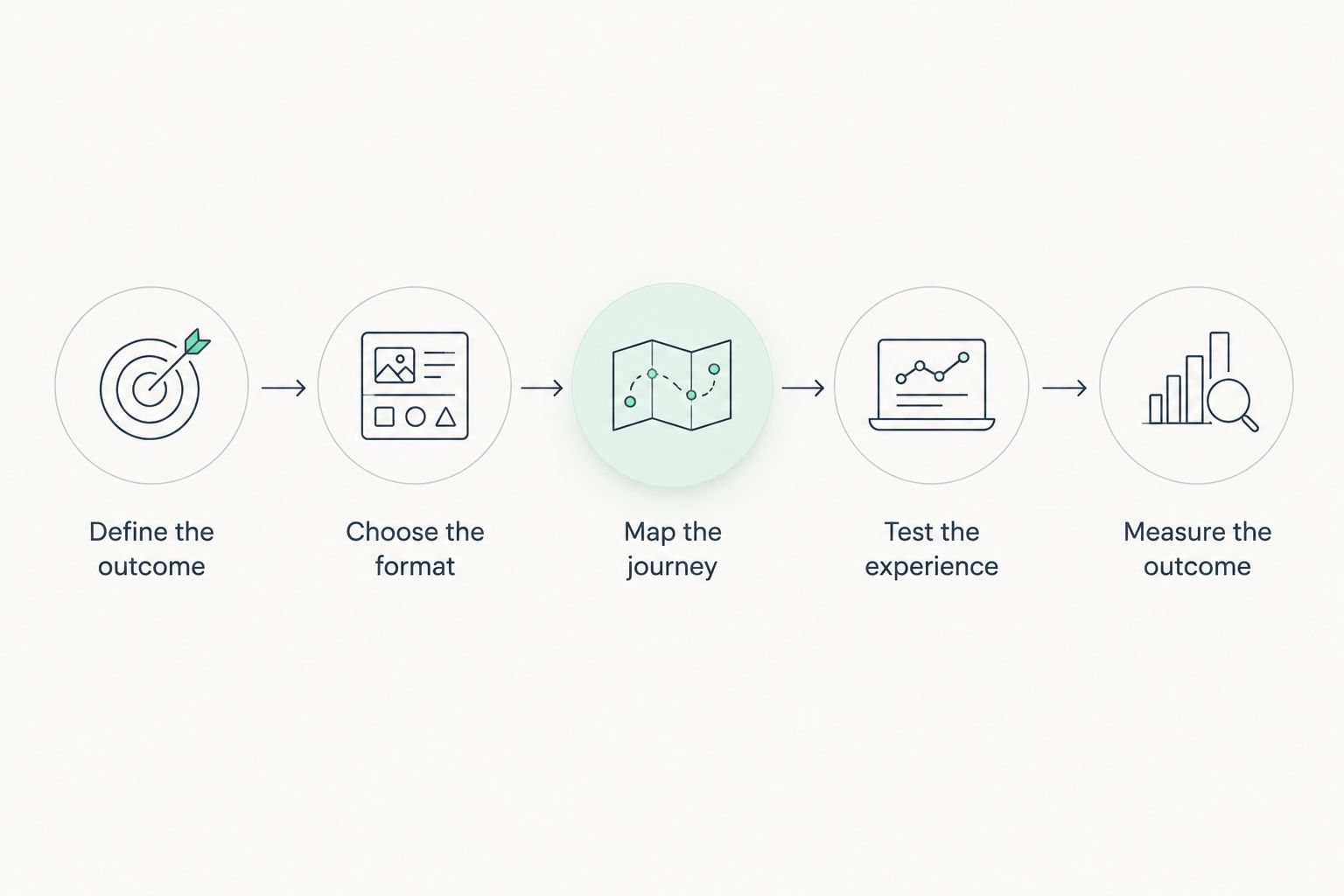
Use this sequence to turn an app-free concept into a testable campaign. Keep the brief focused on participant actions, not a list of features.
- Define the outcome. Choose the action the experience should support: learning a preference, completing a challenge, requesting information, or another clearly specified goal.
- Choose the format. Match the interaction to that outcome. A preference quiz gathers answers directly; a game needs an explicit connection between play and the information you want.
- Map the journey. Write the path from entry to result to next action. Identify where registration, consent, or an external handoff belongs.
- Test the experience. Check the complete journey on intended devices and browsers. Include failed submissions, interrupted sessions, and the final destination.
- Measure the outcome. Record meaningful stages separately so you can distinguish visits, participation, completion, and follow-up actions.
The sequence prevents a common design mistake: building the game before deciding what happens after it. A completion screen should resolve the interaction and explain the next action, not abruptly become an unrelated form.
For your 2026 launch review, test the published entry route as well as the interaction itself. Open the actual email link or scan the actual QR code. A working preview does not establish that the full participant journey works.
Can you collect first-party data without an app?
Yes, a browser-based quiz or game can collect answers and form submissions without an installed app. Installation is not the mechanism that makes information first-party; your direct relationship with the participant and your handling of the information matter.
Separate participation data from identifiable customer data. A completed quiz does not automatically provide an email address, and an email address does not automatically establish permission for every marketing use.
Explain what you collect at the relevant point in the journey. If you offer an optional follow-up, distinguish that choice from completing the game. Keep necessary notices and controls understandable on mobile screens.
Collect information because it supports a defined action, not because the form allows another field. Decide who receives each answer and what they will do with it before adding the question.
Does no app download also mean no login?
No, an app-free experience can still require registration or login. Browser delivery removes installation; authentication is a separate design decision.
Let participants play anonymously when identity is unnecessary for the task. Require identification when the intended experience genuinely depends on an account, saved progress, or a person-specific follow-up.
Do not promise persistent access without designing it. Browser storage alone is not a reliable cross-device identity system. If participants need to return from another device, specify how the experience recognizes them.
How do you know whether browser-based gamification works?
Judge browser-based gamification against the campaign's intended outcome, not against the absence of an installation step. Track where people enter, start, finish, and take the next meaningful action.
Use clear metric definitions. Completion rate means completed experiences divided by started experiences; a visit-to-start rate answers a different question. Keep those denominators visible in reporting.
For a 2026 evaluation, compare results only when you understand differences in audience, traffic source, and campaign goal. A game designed for broad participation and a quiz designed for qualified enquiries do not share the same success criterion.
Where contact details are collected, check whether the resulting records are usable. A large submission total is not a substitute for relevant answers and an appropriate follow-up process.
When does a development studio fit the brief?
Brainylab is best for brands seeking custom gamification experiences for engagement and first-party customer data. The studio builds quizzes, branded games, and interactive experiences; its role is development and creative execution, not merely providing a generic comparison-list product.
A studio brief gives you a place to connect interaction design with campaign objectives. The trade-off is that custom work needs defined requirements: you must decide the entry route, data fields, result logic, and intended handoff rather than leaving them implicit.
When discussing gamification with Brainylab, make browser access an explicit requirement. Also specify whether embedding, saved progress, and data integrations are necessary. Treat each as a scope item rather than assuming it comes with the phrase app-free.
Discuss your gamification brief
Define your browser experience, campaign outcome, and first-party data requirements.
FAQ
Can gamification work without an app download?
Yes, gamification can run in a web browser without an app download. Quizzes, games, progress indicators, and result screens do not inherently require installed software.
What's the best app-free format for a marketing campaign?
A standalone browser experience fits campaigns reached through direct links, while an embedded experience fits an existing landing page. Choose according to where participants arrive and what they should do next.
Can people open a gamified campaign from a QR code?
Yes, a QR code can direct participants to a browser-based campaign. Test the actual destination on intended devices and make the page explain the activity clearly.
Does browser-based gamification work offline?
Offline access requires deliberate implementation; browser delivery alone does not provide it. Specify which parts must work offline and how submissions are handled when connectivity returns.
Do participants need an account to play a browser game?
Participants do not inherently need an account to play a browser game. Registration depends on requirements such as saved progress, identity, or a person-specific follow-up.
Can an app-free quiz collect customer preferences?
Yes, an app-free quiz can collect preference answers directly from participants. Explain the purpose of collection and distinguish answers from permission for subsequent marketing.
Is Brainylab a gamification software vendor or a development studio?
Brainylab is a creative development studio that builds gamification tools and interactive experiences for brands. Its stated work includes quizzes and branded games for engagement and first-party customer data collection.
One last thing
No download does not mean no friction. For your 2026 launch, walk through the campaign from the participant's starting point, not from the developer's preview.
Open the invitation, follow the link, play, submit, and inspect the result. Every requirement before the useful outcome belongs in that review, including registration and consent. Removing installation is only the first design decision.