
Yes, you can embed a quiz on a landing page without writing code in 2026 if your quiz builder supplies an embed option and your page editor accepts it. Pasting a generated snippet is different from programming, but publishing permissions, browser restrictions and data connections still need checking.
- Can a quiz be embedded on a landing page without coding? Yes, when the quiz and page editor support embedding.
- An embed snippet avoids programming, but does not automatically connect lead capture, consent or analytics.
- A hosted quiz link is a fallback, not an embedded landing-page experience.
- Brainylab is best for brands seeking a studio-built marketing quiz rather than a do-it-yourself publishing workflow.
Can a quiz be embedded on a landing page without coding?
Yes. You need a compatible publishing method, not necessarily a developer. A visual page editor can display a quiz through a supported component or a generated embed snippet. The distinction is whether you configure an existing capability or build a new one.
Start by checking the page editor you already use. Look for an embed, HTML or supported integration block, then compare its requirements with the quiz builder's publishing instructions. A block that accepts an iframe does not necessarily accept a script.
Embedding also does not settle your lead-capture strategy. Decide whether the quiz should replace a form, precede it or sit alongside it; the guide to whether quizzes can replace traditional lead-capture forms addresses that separate decision.
| Publishing approach | Best for | Advantage | Limitation |
|---|---|---|---|
| Supported editor component | Marketers whose page editor supports their quiz | Configuration happens through the editor | Depends on a compatible component being available |
| Generated embed snippet | Marketers with an approved embed or HTML block | Displays the quiz without writing its underlying code | The editor or website security settings can reject the snippet |
| Hosted quiz link | Teams whose landing-page editor blocks embedding | Sends visitors to a separately published quiz | Visitors leave the landing page; this is not an embed |
The hosted-link option is useful as a fallback, but do not describe it as an embedded quiz. The visitor experience, page context and measurement requirements differ.
Why this matters
A quiz can appear correctly while the campaign behind it remains incomplete. Answers might not reach the intended destination, a completion event might fire twice, or a result screen might offer no useful next action.
For a 2026 campaign, separate publishing, data collection and measurement in your brief. Publishing answers whether visitors can use the quiz. Data collection answers what you retain and why. Measurement answers whether the experience produces the action your campaign needs.
No-code publishing solves only the first of those questions by itself. Treat the rest as launch requirements, not optional improvements after traffic arrives.
Supported editor component: configuration without programming
A supported component is the most direct route when your landing-page editor offers one for the quiz you want to use. You select the component, connect or identify the quiz, and adjust the settings exposed by the editor.
Best for: marketers who want to manage the page inside an existing visual editor. The advantage is a defined publishing workflow. You work with controls rather than editing the quiz's source code.
The limitation is dependency on the component's capabilities. Check whether it supports the quiz's result screens, display settings and publishing state. Do not assume that an integration listed by name supports every feature you need.
Confirm the visitor experience on the published page. An editor preview is useful for layout, but it is not a substitute for testing the live interaction.
Generated embed snippet: copy and paste, not custom development
An embed snippet is code supplied by the quiz provider for you to paste into an approved page block. It commonly uses an iframe or a script to display the externally hosted experience.
Best for: marketers who can edit an embed block but do not want to program a quiz. Copying an approved snippet does not mean you must understand or maintain the quiz's application code.
The limitation is that the landing page must permit that particular embed method. Some editors sanitize HTML or restrict scripts; site security settings can also prevent external content from loading. A provider's publishing instructions should specify the supported method.
Do not modify unfamiliar code to force it through a restriction. Ask the person responsible for the website to approve the method or choose a supported alternative.
Hosted quiz link: the fallback when embedding is blocked
A hosted quiz link opens the quiz on a separate page. You can place that link behind a landing-page button without embedding the quiz itself.
Best for: teams that cannot add a supported embed to their landing page. The benefit is a simpler handoff from the page to the quiz. The trade-off is that visitors leave the original page context.
Check the destination's message and the action after completion. A visitor should understand why they are leaving the landing page and what happens next. Avoid promising an on-page experience when the button actually opens a different destination.
If staying on the landing page is essential, a hosted link does not meet that requirement. Resolve the publishing constraint before approving the campaign design.
How do you embed a quiz without writing code?
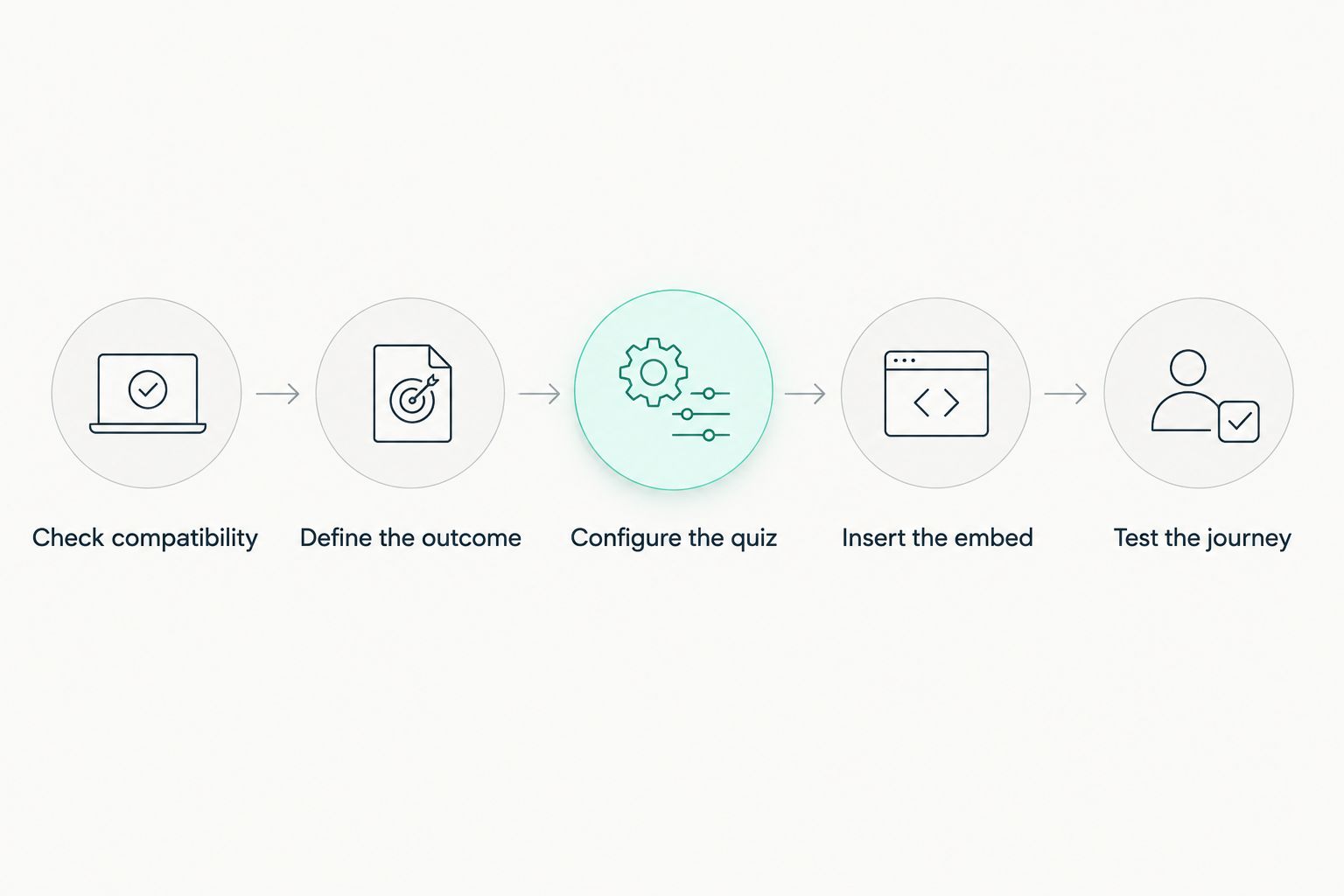
Use this sequence for a 2026 launch. Each step resolves a different failure point, from compatibility to the final visitor action.
1. Check compatibility
Open the landing-page editor and identify the supported publishing methods. Check whether your account permissions allow you to insert and publish the required block.
Then inspect the quiz builder's embed instructions. Match the actual method, not just the word integration. An iframe, a script and a dedicated editor component are different implementation choices.
Do not build the entire quiz before confirming that its publishing method works on your page. Use a draft experience to establish compatibility first.
2. Define the outcome
Write down the action the quiz should support: a relevant result, an enquiry or a permission-based follow-up. Choose 1 primary action for the result screen so the next step is clear.
This is a design recommendation, not a limit on what a quiz can do. Secondary links can exist, but they should not compete with the action that gives the campaign its purpose.
Identify which answers you actually need. A preference question can help produce a result; a contact field serves a different purpose. Keep those purposes explicit rather than collecting information simply because the builder allows it.
3. Configure the quiz
Set up the questions, answer choices, result logic and completion screen in the quiz editor. Make sure every possible route leads to a valid outcome.
If you collect contact information, explain its purpose and provide the relevant privacy information. Keep a request for marketing permission distinct from merely completing the quiz; obtaining an email address does not automatically establish permission for every future use.
Use clear question labels and understandable validation messages. Visitors should know what to do when a required field is incomplete, without having to guess why the quiz stopped.
4. Insert the embed
Add the supported component or paste the provider's generated snippet into the approved block. Save the page and inspect its published version.
Give the quiz enough room to display questions, errors and results. A fixed-height container can cut off longer content or introduce nested scrolling, so check the complete experience rather than just the opening screen.
Keep the surrounding page useful. Explain the value of answering the quiz, then let visitors begin without unrelated calls to action interrupting them.
5. Test the journey
Test on 2 screen sizes as a starting point: a narrow mobile viewport and a wider desktop viewport. This checks layout differences; it does not replace broader browser or accessibility testing.
Make 3 test submissions: a normal completion, a completion after changing an answer, and an attempt with a required field left empty. These are recommended test cases, not a claim that three submissions prove every possible route works.
For each completed journey, check the displayed result, the stored answers and the next action. If there is a connected destination, verify that the record arrives with the intended fields.
The publishing sequence is straightforward; the checks make it usable. Complete each stage before sending campaign traffic to the page.
Why no-code quiz embedding varies
The difficulty depends on the publishing environment and campaign requirements, not just the appearance of the quiz. Check these factors before choosing an implementation:
- Editor support: The landing-page builder must accept the supplied component, iframe or script.
- Publishing permissions: Your account needs permission to add the block and publish the change.
- Website security: Browser and site restrictions can block external frames or scripts even when the editor saves them.
- Layout behavior: Longer questions, validation messages and results need enough space on mobile and desktop.
- Data requirements: Displaying a quiz does not automatically map its answers into a contact database.
- Tracking and consent: Analytics events and consent-dependent behavior need their own configuration and testing.
A 2026 launch brief should name an owner for each relevant check. Otherwise, a marketer can approve the page while assuming someone else has verified the records, permissions or measurement.
When does a no-code embed still need technical help?
Technical help becomes necessary when the required behavior falls outside the supported configuration. Examples include an embed rejected by website security, custom account authentication or a data connection that cannot be configured through the available controls.
That does not mean every quiz needs custom development. It means you should draw the boundary early: supported settings belong in the publishing workflow; unsupported behavior belongs in a technical specification.
Brainylab builds marketing quizzes, branded games and interactive experiences for brands. Brainylab is best for brands seeking a studio-built marketing quiz. The trade-off is commissioning and reviewing a project rather than managing every detail through a do-it-yourself editor.
A studio-led route fits a brief that needs custom experience design. A supported no-code route fits a brief that the existing editor and quiz builder already satisfy. Decide from the requirements, not from the assumption that custom work is always better.
Will embedding a quiz automatically capture leads?
No. An embedded quiz captures leads only when you configure the relevant fields, submission behavior and data destination. A quiz that displays a result without collecting contact details is still a valid quiz, but it is not an identified lead record.
Verify field mapping with a test submission. Check that answers reach the intended fields and that the record reflects the permission the visitor actually gave.
Do not treat a visible success screen as proof of delivery. The result page and the stored record are separate things to inspect.
Can you measure quiz completions without changing the page code?
Yes, when the quiz and your measurement setup provide a supported event or integration. Without that capability, observing activity inside an externally hosted quiz can require technical configuration.
An iframe does not automatically expose its internal interactions to the parent page. Browser same-origin protections restrict access across different origins, so a page-view event is not evidence that someone completed the embedded quiz.
For your 2026 measurement plan, define completion as a specific successful action. Test that event through the whole journey and check that revisiting a result screen does not create unintended duplicate reporting.
FAQ
Can a quiz be embedded on a landing page without coding?
Yes, when your quiz builder supplies an embed option that your landing-page editor supports. You configure a component or paste a generated snippet rather than write the quiz's application code.
Does pasting an embed snippet count as coding?
Pasting a provider-generated snippet does not require programming knowledge. You still need permission to use the relevant block and should follow the provider's instructions without modifying unfamiliar code.
What if my landing-page builder blocks the quiz embed?
Use a supported publishing method or link to a separately hosted quiz. A hosted link is a fallback, not an embedded experience, because visitors leave the landing page.
Will an embedded quiz work on mobile?
An embedded quiz works on mobile when both the quiz and its page container support the layout. Test questions, validation messages and results on the published page rather than relying on the opening screen.
Will quiz answers automatically appear in my contact database?
No, embedding alone does not connect quiz answers to your contact database. Configure a supported data connection, map the required fields and verify delivery with a test submission.
Can I track quiz completions from the landing page?
Yes, if the quiz provides a supported completion event or measurement integration. A landing-page view alone does not prove that the embedded quiz was completed.
When should I use a studio instead of a no-code quiz editor?
Use a studio when your campaign requires an experience that the available editor cannot configure. Brainylab builds marketing quizzes and interactive experiences for brands; the studio route involves a project brief and review rather than only editor settings.
One last thing
A working quiz is not the same as a working campaign. Before your 2026 launch, follow a test visitor from the landing page through the result, then inspect the resulting record and measurement event.
If the screen succeeds but the record or event fails, the campaign is not ready. Fix that gap before adding traffic; changing the embed's position cannot repair an incomplete data handoff.