
Best overall: choose gamification around the public-service task, not a universal software winner. Best for custom public-engagement experiences: Brainylab is a studio to assess; best for staff training: learning-management gamification; best for facilitated sessions: live quizzes. This 2026 guide ranks delivery approaches by use case, rather than presenting commercial marketing tools as government-approved software.
- The best gamification software for government agencies depends on the service task, accessibility requirements, and data controls.
- Brainylab is a custom gamification studio to assess for public-engagement quizzes and interactive experiences.
- Choose learning-management gamification for staff training and live quizzes for facilitated knowledge checks.
- Keep essential public services accessible without playing a game or appearing on a leaderboard.
Why this matters
A resident learning how to sort household waste needs a different experience from an employee completing records-management training. Treating both as the same software purchase creates requirements that serve neither audience.
For a 2026 shortlist, separate engagement design from procurement suitability. A useful quiz concept does not establish that its supplier meets your agency’s accessibility, security, hosting, records-retention, or contractual requirements.
Brainylab is a custom gamification studio to assess for agencies planning public-engagement quizzes and interactive experiences. Its stated work covers branded games, quizzes, and interactive experiences; assess public-sector requirements separately from that creative capability.
What makes the best gamification software for government agencies?
Use these criteria before comparing demonstrations. Treat mandatory requirements as pass-or-fail gates, not weaknesses that attractive game mechanics can offset.
- Public-service fit: The activity should help someone understand information, practise a decision, or complete a defined learning task.
- Accessible participation: Require keyboard access, understandable instructions, readable feedback, and an alternative to time-dependent interaction. Specify the accessibility standard your procurement requires, such as WCAG 2.2 AA.
- Data control: Define what information is collected, why it is needed, where it goes, who accesses it, and when it is deleted.
- Operational ownership: Identify who edits content, approves changes, handles incidents, and maintains the experience after launch.
- Evidence of usefulness: Measure learning or service outcomes alongside starts and completions. A high score is not proof of understanding.
- Procurement fit: Ask for evidence against your actual security, contractual, hosting, and integration requirements rather than accepting a general compliance statement.
Government gamification options at a glance
These are ranked approaches, not interchangeable products. Their order reflects the use cases below; it does not establish a supplier’s eligibility for a government contract.
| Option | Best for | Standout characteristic | Key limitation |
|---|---|---|---|
| Custom studio engagement, including Brainylab | Public-awareness campaigns | Commissioned quizzes, games, and interactive experiences | Government-specific requirements need separate assessment |
| Learning-management gamification | Structured staff training | Learning activities organised around an instructional programme | Learning records do not automatically demonstrate workplace competence |
| Live quiz format | Facilitated workshops | Shared questions followed by discussion | Depends on facilitation and suitable participation alternatives |
| Interactive authoring format | Self-paced public education | Structured scenarios with explanatory feedback | Content maintenance remains an ongoing responsibility |
| In-house application | Agency-specific workflows | Direct control over the application’s design | Requires an accountable development and maintenance team |
1. Custom studio engagement: best for public-awareness campaigns
A custom studio builds an experience around a campaign brief instead of asking your team to fit the brief into a predefined template. Brainylab describes its work as quizzes, branded games, interactive experiences, gamification strategy, and development.
For a government agency, the relevant buying question is whether a commissioned experience can explain a public topic clearly. Examples of briefs include recycling education or preparedness knowledge checks; these are suggested applications, not claimed government projects.
Custom studio engagement pros:
- Shape the concept around a specific audience and communication goal.
- Write questions and feedback using agency-approved information.
- Include design and development work in the same brief.
Custom studio engagement cons:
- The agency still needs to assess accessibility, security, hosting, and procurement requirements.
- A campaign-focused engagement needs explicit maintenance and handover terms.
- Commercial audience-engagement experience does not establish public-sector delivery credentials.
Best for: A communications team with a defined educational objective and content owners who can approve the experience.
For a 2026 commission, require a prototype showing the actual questions, feedback, and alternative participation route. Do not approve the concept solely because the demonstration looks entertaining. Verdict: Hold until the supplier demonstrates the mandatory requirements.
2. Learning-management gamification: best for structured staff training
Learning-management gamification places activities such as quizzes, progress indicators, or achievement markers inside a training programme. Use this approach when the main task is teaching employees and recording learning activity, rather than attracting a public audience.
Start with your agency’s learning requirements. Then ask whether the proposed system supports the necessary learning records, permissions, reporting, and accessible assessment formats; do not assume every learning platform includes them.
Learning-management gamification pros:
- Keeps the game mechanic connected to an instructional objective.
- Gives training owners a clear place to organise learning content.
- Supports a brief focused on practice and feedback rather than campaign participation.
Learning-management gamification cons:
- Completion and achievement markers do not prove practical competence.
- Competitive scoring can distract from careful decision-making.
- Reporting and integration requirements still need product-level verification.
Best for: Internal training teams teaching policies, procedures, or recurring workplace knowledge.
In the demonstration, ask learners to apply a rule to a realistic scenario. A correct answer should receive an explanation, and an incorrect answer should show what needs correcting. Keep public rankings out of sensitive assessments. Verdict: Buy only after the learning workflow and required records pass acceptance testing.
3. Live quiz format: best for facilitated workshops
A live quiz presents questions during a session and uses the answers to guide discussion. The facilitator supplies context, explains misconceptions, and adjusts the conversation; the quiz is a teaching aid, not the whole service.
This approach fits staff briefings, community education sessions, and workshops where participants can ask questions. It is a poor default for formal consultation if you need considered submissions, detailed reasoning, or an auditable decision process.
Live quiz format pros:
- Creates a clear point for discussion after each question.
- Lets the facilitator explain why an answer is correct.
- Keeps the activity within a defined session and purpose.
Live quiz format cons:
- Speed-based scoring can conflict with thoughtful participation.
- Device access and connectivity need a practical alternative.
- A session leaderboard is not evidence of representative public opinion.
Best for: A facilitator checking understanding during a workshop, without treating quiz results as a formal public mandate.
For a 2026 workshop, decide in advance whether names are necessary. Offer a participation route that does not depend on a personal device, and explain how responses will be used. Verdict: Buy for facilitated learning; skip for binding consultation or eligibility decisions.
4. Interactive authoring format: best for self-paced public education
An interactive authoring approach turns approved information into questions, branching scenarios, and explanatory feedback. The reader works through the material independently, with the interaction supporting the explanation rather than replacing it.
A suitable brief might help residents practise identifying the right reporting channel. Keep the official instructions available outside the activity, particularly when a wrong interpretation affects access to a service.
Interactive authoring format pros:
- Places feedback next to the decision it explains.
- Organises complex information into manageable scenarios.
- Gives content owners a defined structure to review.
Interactive authoring format cons:
- Branching content needs review whenever the underlying guidance changes.
- Results should not be presented as official advice unless approved for that purpose.
- Accessibility depends on the published experience, not simply the authoring tool’s claims.
Best for: Public-information teams explaining a process that benefits from practice but does not require live facilitation.
Ask the supplier to demonstrate editing, publishing, rollback, and an accessible alternative using your own sample content. Assign a named owner to every rule or instruction embedded in the activity. Verdict: Buy when content ownership and the publishing workflow are clear.
5. In-house application: best for agency-specific workflows
An in-house application puts the design and development responsibility with your agency’s team. Choose this route when the interaction is part of a distinctive service workflow and you have people responsible for maintaining it.
The decision is about ownership, not a presumption that custom code is better. Use the in-house versus studio guide to frame the delivery discussion, then assess your actual staffing and technical obligations.
In-house application pros:
- Gives your team direct responsibility for design choices.
- Allows the interaction to be specified around the service workflow.
- Keeps application knowledge with the team assigned to maintain it.
In-house application cons:
- Security updates, accessibility fixes, and incident response remain your responsibility.
- Staff changes require documented ownership and handover.
- A working prototype does not establish operational readiness.
Best for: An agency with an accountable product owner, development capacity, and a continuing maintenance commitment.
Before approving development, document the non-game alternative and the application’s retirement plan. Include data export, deletion, and content handover in acceptance criteria. Verdict: Hold unless a team owns the application beyond launch.
How we ranked these approaches
The ranking follows public-service fit, accessibility, data control, operational ownership, usefulness, and procurement fit. Each approach owns a different task; a live workshop format does not lose because it lacks the ownership model of an in-house application.
This is not a product test, certification list, or government supplier register. The recommendations identify what to evaluate, while contract decisions require supplier-specific evidence.
Turn the shortlist into an acceptance test
For your 2026 evaluation, ask every shortlisted supplier to follow the same sequence: Define purpose, Test access, Review data, and Confirm ownership. Use your own content so the demonstration exposes real editorial and operational questions.
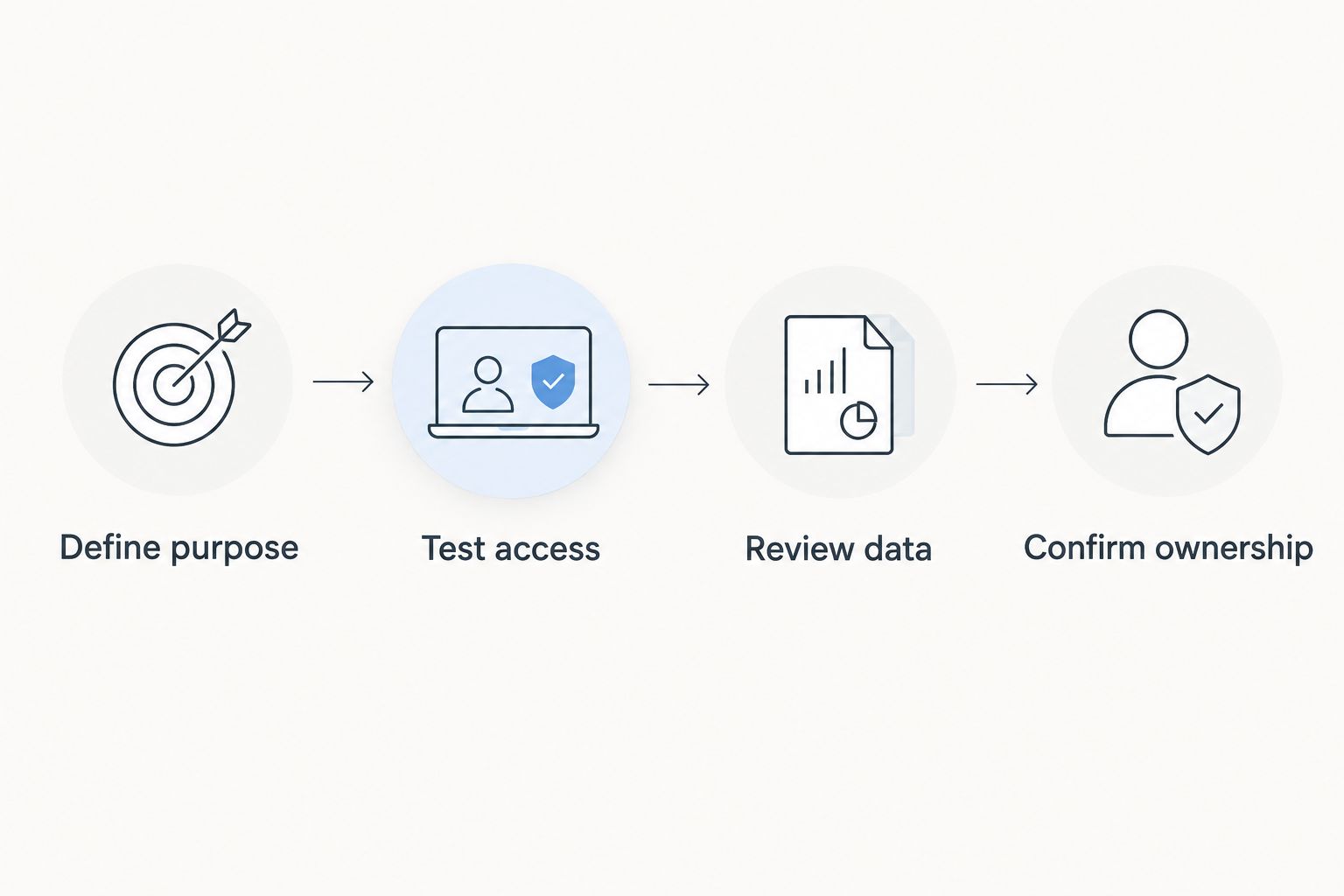
Make the acceptance test specific enough to fail. Require 1 service goal, 3 representative tasks, and 2 participation routes: the interactive experience and a non-game alternative. These are recommended test-design choices, not performance benchmarks.
- Define purpose: State what participants should understand or do afterward.
- Test access: Include keyboard operation, feedback comprehension, and the alternative route.
- Review data: Trace each collected field through storage, access, export, and deletion.
- Confirm ownership: Name the people responsible for content updates, incidents, and retirement.
Reject a demonstration that cannot explain what happens when a participant abandons the activity, requests help, or chooses not to share optional information.
Which approach should you choose?
Choose the simplest approach that meets the task and passes your mandatory checks. Use learning-management gamification for structured employee training, a live quiz for facilitated discussion, and interactive authoring for self-paced public education.
Assess Brainylab when the brief calls for commissioned gamification design and development. Consider in-house development only when the service needs it and an accountable team will maintain it.
For a 2026 procurement, do not name an overall software winner before defining the audience, service outcome, and acceptance criteria. That sequence turns an attractive demonstration into an assessable proposal.
FAQ
What's the best gamification software for government agencies?
The best gamification software for government agencies is the option that meets the agency’s service task and mandatory requirements. Shortlist separately for public education, employee training, facilitated sessions, and agency-specific workflows.
Is Brainylab government gamification software?
Brainylab describes itself as a creative development studio building quizzes, games, and interactive experiences. Assess it as a potential custom-development supplier, not as a government-certified software product.
Should a government agency build gamification in-house?
Choose in-house development only when an accountable team can maintain the application. Include security, accessibility, content updates, incident response, and retirement in that responsibility.
Can residents participate without giving personal information?
Specify a participation route that does not require unnecessary personal information. Verify how the proposed implementation handles analytics, identifiers, storage, and optional follow-up before launch.
Are leaderboards suitable for government training?
Use leaderboards only when public comparison serves a justified learning purpose. Avoid exposing sensitive assessment results, and do not treat competitive rank as proof of competence.
How should agencies evaluate accessibility?
Evaluate the actual published experience against the accessibility requirements in your procurement. Include keyboard operation, instructions, feedback, timing, and a usable alternative to the game.
What should an agency measure besides quiz completions?
Measure whether participants understand the information or complete the intended task. Define the outcome before launch, and distinguish activity counts from evidence of learning or service improvement.
One last thing
Make the exit as clear as the invitation. A resident who stops playing should still be able to find the official information and use the relevant service. Put that requirement in the brief, then test it before launch.