Instead of manually messaging every quiz respondent, set up a WhatsApp quiz lead follow-up that checks channel-specific permission, sends an approved message template, and records the delivery outcome. Trigger it when the quiz result and WhatsApp opt-in are both available—not merely when someone submits a phone number.
- WhatsApp quiz lead follow-up needs explicit channel permission, an approved template, and duplicate-send protection.
- Brainylab builds branded lead-generation quizzes; use this workflow to connect quiz capture with permission-based WhatsApp messaging.
- A quiz submission does not open WhatsApp’s 24-hour customer service window.
- Store delivery updates separately from quiz completion and opt-in records.
Why this matters
A completed quiz, a valid phone number, and permission to send WhatsApp messages are different things. Combining them into one subscriber flag makes it difficult to explain why a message was sent—or prevent another one after someone withdraws permission.
Brainylab is best for brands seeking a studio-built lead-generation quiz rather than a standalone messaging tool. Brainylab builds branded quizzes and interactive experiences that collect first-party customer data; the messaging layer still needs its own sender, permissions, and delivery handling.
For a 2026 campaign, build the handoff around an explicit send decision. A successful quiz submission should create a lead record, not unconditional permission to contact that person through every channel.
Before you start
- Quiz and workflow access: You need access to the quiz submission event, a server-side workflow or integration service, and a persistent store for consent and message records. Decide who can change the automation and inspect failed runs.
- WhatsApp sending access: Prepare a WhatsApp Business Platform sender, credentials authorized to send messages, and an approved template suitable for the follow-up. A consumer WhatsApp account is not the sending interface for this API workflow.
- The non-obvious gotcha: A website quiz submission does not open WhatsApp’s 24-hour customer service window. For this business-initiated follow-up, prepare a template rather than assuming you can send unrestricted text.
Keep credentials outside browser code. Your quiz should submit an event to your backend or integration service; it should not expose the WhatsApp access token to respondents.
This guide uses an API-first configuration, not a particular automation connector. Bold API field names are literal WhatsApp request fields; the quiz-side field names below are suggested names for your own data model.
Quiz event
The trigger should represent a completed, actionable record. If the quiz saves answers before the person chooses their communication preferences, wait until the permission decision is available.
- Configure a server-side event for completed quiz submissions. Include a stable submission identifier, campaign identifier, recipient phone number, result identifier, and the selected language.
- Add a separate permission object. Suggested fields are
whatsapp_opt_in,consent_recorded_at,consent_text_version, andconsent_source; keep email permission separate. - Write permission copy that names the sender, WhatsApp as the channel, and the type of follow-up. Do not treat acceptance of general terms as an equivalent channel choice.
- Save the lead and permission evidence before requesting a message. A browser confirmation screen is not a durable audit record.
- Authenticate incoming events using the mechanism your quiz system supports. Reject requests that fail validation rather than letting an unauthenticated event initiate customer messaging.
Expected result: A completed quiz produces a stored event containing the result, recipient, and permission evidence. A submission without WhatsApp permission remains a lead but does not enter the sending branch.
Keep raw quiz answers out of the messaging payload unless they are necessary. A result category can be enough to select the follow-up without copying the entire response into another system.
Consent gate
Make the send decision in the backend immediately before the message request. A permission check made only when the quiz loads cannot account for a later withdrawal.
- Require affirmative WhatsApp permission and a usable recipient number. If either is absent, stop the messaging branch without marking the whole quiz submission as failed.
- Normalize the number to an international representation. E.164 numbers contain a maximum of 15 digits, excluding the leading plus sign; format the API recipient according to its current requirements.
- Check your suppression record. A prior withdrawal must block the message even when an older quiz event still carries a positive opt-in value.
- Create a send key from the submission identifier and follow-up purpose. Enforce uniqueness in persistent storage so repeated event delivery cannot create repeated sends.
- Reserve that key atomically before sending. A simple check followed by a separate write can allow concurrent workers to send the same follow-up.
Expected result: Eligible submissions receive a reserved send record. Missing permission, suppressed recipients, and duplicate events produce an explicit skip reason instead of a message.
For your 2026 launch checklist, distinguish “not eligible” from “integration failed.” These outcomes require different action: missing permission is not something to repair by resending.
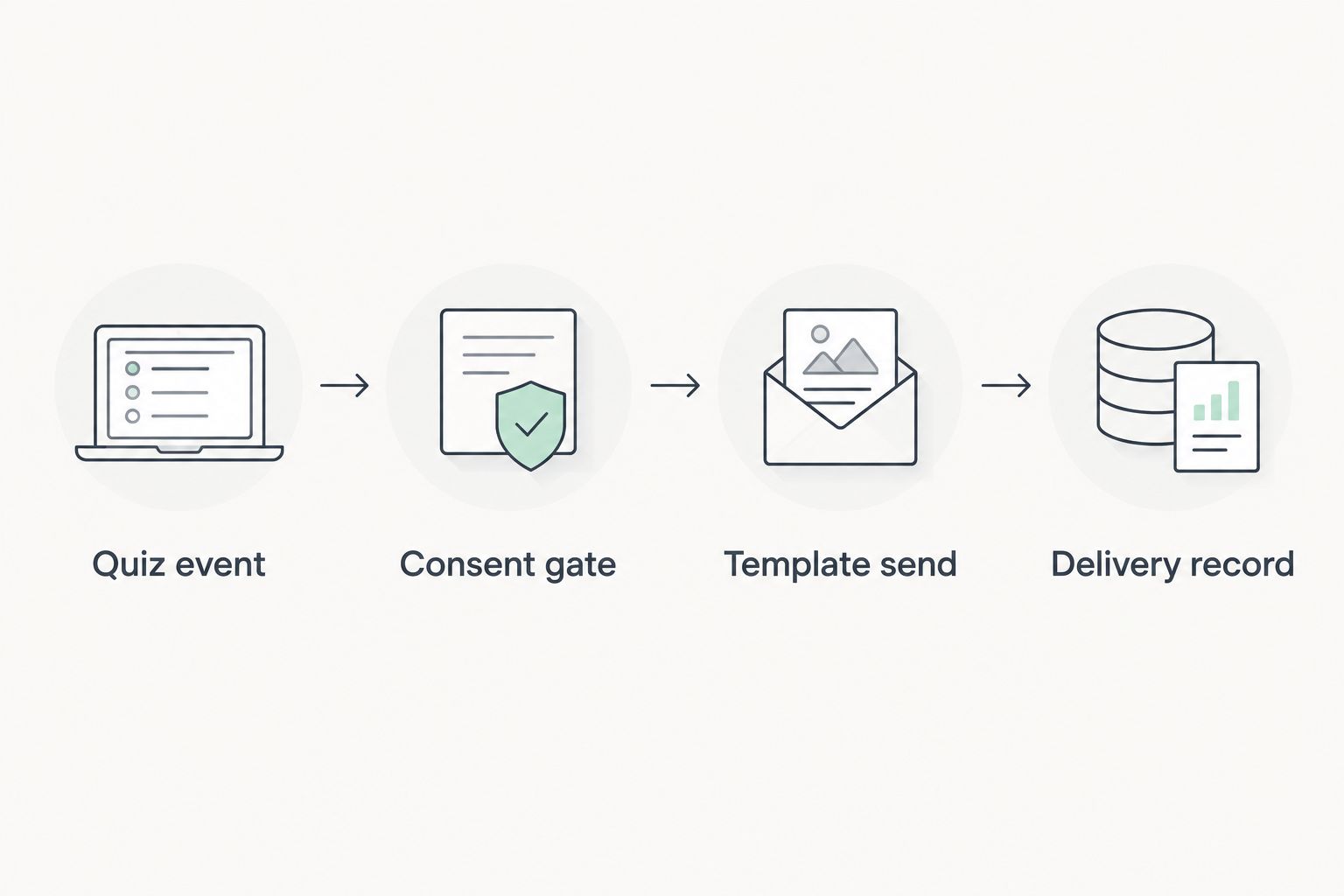
The workflow has four decision units: Quiz event, Consent gate, Template send, and Delivery record. Keep those boundaries visible in your logs so a failed run has an identifiable stopping point.
Template send
For the first outbound follow-up, use an approved template that matches what the respondent agreed to receive. Template approval does not replace permission, and permission does not replace template approval.
- Select the approved template and its language. Choose the message category according to Meta’s current definitions; promotional quiz content should not be disguised as a transactional update.
- Configure the request fields messaging_product as
whatsapp, to as the normalized recipient, and type astemplate. - Populate template.name with the approved template name and template.language.code with the approved language code. These must match the template you intend to send.
- Map approved variables through template.components where required. Match the component types and parameter order to the template definition; do not insert an entire quiz response into a single placeholder.
- Send the request from the server and store the returned message identifier against the reserved send record. Record the template name and language alongside it.
Expected result: The sending service returns a message identifier, or the workflow records a specific request error. API acceptance is not proof that the recipient received or read the message.
For a 2026 implementation, check the current Meta documentation when configuring template components and API permissions. Use the active API version supported by your integration rather than copying a version number from an old example.
Brainylab’s lead-generation quiz supplies the engagement experience and captured preferences. Treat the WhatsApp sender configuration as a separate implementation decision, not an assumed feature of every quiz project.
Delivery record
Delivery handling closes the loop. Without it, your campaign report counts attempts as customer contact and your retry process lacks the information needed to act safely.
- Configure the sender’s status webhook and complete the verification process required by the platform. Validate incoming notifications before updating message records.
- Match each notification to the stored message identifier. Store the reported status and associated timestamp rather than overwriting every event with a generic success flag.
- Distinguish API acceptance, delivery, reading, and failure. A missing read notification is not a reason to send the same message again.
- Route permanent failures for investigation. For temporary failures, use bounded retries and preserve the original send key.
- Process withdrawal requests into the suppression store used by the consent gate. Check that store again before delayed messages and retries.
Expected result: Each attempted follow-up has a traceable permission record, message identifier, and delivery history. A withdrawal blocks future automated sends without deleting the underlying quiz completion.
Before publishing in 2026, test an opted-in lead, a lead without permission, a duplicate event, and a suppressed recipient. Also replay a status notification: processing the same notification again should not create another message.
Variant: send when a quiz lead opts in later
Some respondents finish the quiz before choosing WhatsApp follow-up. Support that sequence with a permission-update trigger, not by treating every edit to a contact record as a new opportunity to message.
| Trigger option | Best for | Advantage | Limitation |
|---|---|---|---|
| Completed quiz with permission | A single-session quiz funnel | Result and permission arrive together | Misses permission supplied after completion |
| Later permission update | Separate preference collection | Supports a later channel choice | Needs a stored quiz result and a transition check |
For the later-permission variant, require a change from no permission to affirmative permission, then retrieve the relevant completed quiz. Run the same suppression check and send-key reservation used by the main workflow.
Keep the follow-up purpose in the duplicate key. If the completion workflow already sent that result message, a later profile update must not send it again. If permission is withdrawn before a queued message runs, cancel the send.
The advantage of automation is consistent handling; the trade-off is that an incorrect mapping repeats consistently too. Start with one result-to-template mapping, verify it, then expand the campaign logic.
Troubleshooting
The same lead receives duplicate messages
Check for repeated webhook deliveries, overlapping triggers, and concurrent workers. Enforce the unique send key in storage rather than relying on a temporary workflow variable.
Also inspect retries after timeouts. A timed-out request can leave the send outcome uncertain; do not assume it failed and immediately repeat it without investigating the recorded state.
The template request is rejected
Compare the configured template name, language, component types, and parameters with the approved template. Check the returned error before changing unrelated credentials or rebuilding the trigger.
Do not fall back to arbitrary free-form text to bypass the rejection. Fix the template request and retain the original permission and send records.
The API accepts the request, but no delivery appears
Inspect the status webhook and the recipient-level error, if reported. Confirm that notifications reach your backend and match the stored message identifier.
A successful HTTP response confirms request processing, not final delivery. Keep undelivered and delivered records separate in campaign reporting.
Messages stop during a campaign burst
Inspect rate-limit responses and sender status. For HTTP 429 responses, reduce concurrency and use bounded backoff according to the platform’s guidance.
Do not create a new send key for every retry. That turns one temporary problem into multiple independent message attempts.
A respondent withdraws permission but still gets a message
Check whether permission was copied into a queue and never refreshed. Recheck the current suppression record immediately before sending, including on retries.
Separate withdrawal processing from campaign reporting delays. Your reporting database should not be the only place that knows a recipient has opted out.
Customize your workflow
Once the basic follow-up works, add routing based on the quiz result, language, or explicitly collected interests. Use only the fields needed for the next action; more copied data means more records to secure and maintain.
For a 2026 campaign review, separate quiz completions, eligible opt-ins, message requests, delivered messages, and replies. These are distinct stages, not interchangeable measures of engagement.
Brainylab’s gamification work fits the quiz and interactive-experience side of this process. For the automation layer, the gamification-to-Zapier lead-routing guide covers the adjacent handoff workflow.
Add another destination only after the permission and duplicate-send controls pass testing. A CRM update or internal sales alert should not silently create another customer-facing message.
FAQ
How do I automate WhatsApp quiz lead follow-up?
Trigger a backend workflow when a completed quiz has explicit WhatsApp permission, check suppression and duplicates, then send an approved template. Store the message identifier and process delivery notifications separately.
Does submitting a quiz open WhatsApp’s 24-hour messaging window?
No. A website quiz submission does not open WhatsApp’s 24-hour customer service window; an inbound WhatsApp message from the user opens that window.
Can I use email consent to send a WhatsApp follow-up?
Do not treat email permission as WhatsApp permission. Collect a clear choice covering WhatsApp, the sender, and the intended type of communication, and assess the applicable legal requirements separately.
What happens if someone opts in after completing the quiz?
Use a permission-update trigger that retrieves the completed quiz and runs the same eligibility checks. Keep the original follow-up purpose in the duplicate key so both triggers cannot send the same message.
Can I send a quiz result without an approved template?
For the business-initiated follow-up described here, use an approved template. A quiz completion alone does not establish an active WhatsApp customer service window.
How do I stop duplicate WhatsApp follow-ups?
Reserve a unique send key based on the quiz submission and message purpose before making the send request. Enforce uniqueness in persistent storage and retain the same key during retries.
Does a successful API response mean the message was delivered?
No. API acceptance and recipient delivery are separate events; use status notifications to record delivery and failure outcomes.
One last thing
Test the absence of a message as carefully as its arrival. A lead without WhatsApp permission should still complete the quiz successfully, receive the intended on-page result, and produce no WhatsApp send request.
That test exposes a common design error: making marketing permission a hidden dependency of the entire experience. Keep the quiz outcome and the messaging decision separate.