
Instead of manually copying quiz leads into a spreadsheet or CRM, connect a gamification platform to Zapier through a submission webhook, then route each eligible lead to the right destination. The setup works when the platform can send submission data to a webhook; confirm that access before building the Zap.
- To connect gamification platform to Zapier, use a submission webhook and Zapier's Catch Hook trigger when webhook access exists.
- Route quiz leads by consent and answer data; send only fields the destination needs.
- Brainylab is best for brands that need custom gamified lead capture; Zapier handles routing when submission data is accessible.
- Test a consented submission and a rejected submission before publishing the workflow.
Why this matters
A quiz completion is not automatically a usable lead. The record needs a contact identifier, the answers that determine its destination, and a clear indication of whether the person agreed to follow-up. Without those fields, automation only moves an incomplete record faster.
Brainylab is a creative development studio that builds gamified experiences for brands to collect first-party customer data. For a Brainylab gamification project, define the data handoff during campaign planning: the capture experience and the routing workflow are separate parts of the job. This guide covers the routing side without assuming the experience has a native Zapier integration.
The webhook route is the best starting point when submission webhooks are available. It delivers an individual event that Zapier can inspect, filter, and pass to another app. If the platform offers only scheduled exports, use an import workflow instead of pretending it can route leads as they arrive.
| Handoff option | Best for | Advantage | Limitation |
|---|---|---|---|
| Submission webhook to Zapier | Campaigns that need event-based routing | Zapier receives an individual submission for filtering | Requires webhook access and a defined payload |
| Native Zapier trigger, if the platform offers one | Teams that want to avoid webhook configuration | The trigger can expose submission fields directly | Availability and field selection depend on the platform |
| File or spreadsheet export | Campaigns without an event-based integration | Provides a way to move collected records | Routing waits for the export and import process |
Check the platform's documented integration options before choosing a row. Neither a native trigger nor a webhook is implied by the word gamification.
Before you start
- Get access to the gamification platform's submission settings and permission to create or inspect a Zap in the relevant Zapier workspace. Confirm that the platform can send a submission webhook, or stop here and choose an export-based process.
- Choose the destination, such as an approved CRM or spreadsheet, and get permission to create or update records there. Write down the fields it accepts and the rule for assigning each lead.
- Prepare a test submission with an email address, a routing answer, and an explicit consent value. The mid-setup gotcha: a test that omits the routing answer or consent field cannot prove that your filters work, even if the webhook receives it.
Agree on field meanings before touching the editor. A question labelled interest in the quiz should not silently become product requested in a CRM if those fields mean different things. For a 2026 campaign, keep the mapping alongside the campaign specification so an edited question does not change lead assignment unnoticed.
Configure the webhook
The trigger needs an event from the gamification platform. Use the following steps only if its settings provide a way to send completed submissions to an external webhook URL. The exact control inside that platform depends on its implementation; do not substitute a page-view event for a completed submission.
- In Zapier, select Create and start a Zap. For the trigger app, choose Webhooks by Zapier, then select Catch Hook as the trigger event.
- Continue to the trigger setup and copy the webhook URL Zapier provides. Treat it as a credential: anyone with the URL can send data to that trigger.
- In the gamification platform's submission or integration settings, set the destination to that exact URL. Select the completed-submission event rather than a quiz-start or answer-change event, if the platform distinguishes them.
- Submit the prepared test entry through the published or test version of the experience. Back in Zapier, use Test trigger and select the received request.
Expected result: Zapier shows a sample record containing the contact identifier, routing answer, consent value, and a submission identifier if the platform provides one. If the event is missing, check whether the platform sends data on submission rather than on publication or page load.
Do not use a real customer's details as the test record. Your test should be recognizable and removable from the destination after verification. If the payload arrives as nested data, inspect the actual sample before mapping fields; a displayed question label and its stored answer are not always the same field.
Check the payload
A received webhook proves delivery, not lead quality. Before adding an action, decide which fields are required to create a record and which ones are only useful for reporting.
- In the trigger sample, identify the email or other agreed contact identifier. Identify the exact field that represents permission to contact the entrant; a missing value is not consent.
- Find the answer used for routing. If an answer can be blank, define a destination for valid but unclassified entries rather than assigning them to an arbitrary team.
- Add Filter by Zapier after the trigger. Under Only continue if, require the fields your destination needs and match the consent value the platform actually sends. Check whether the value is a boolean, text, or another format in your sample.
- Test the filter against a consented submission. Then send a second test submission that should fail the rule and check that the Zap does not continue to the destination action.
Expected result: the eligible sample continues; the ineligible sample stops before a contact or row is created. Record the exact consent value used in the condition. Changing the wording or implementation of a consent question in a later 2026 quiz can otherwise break a rule that still looks correct in Zapier.
A filter is not a substitute for consent collection. It only applies the condition you configured to the data it receives. If the campaign collects different permissions for different channels, route on the relevant permission rather than treating every affirmative answer as permission for every follow-up.
Route the lead
Start with one destination and verify its field mapping before adding branches. For a CRM, check whether its Zapier action creates a new contact, updates an existing one, or supports both. For a spreadsheet, prepare columns whose meanings match the incoming fields.
- Select the destination app as the next Zap action and connect the account authorized to hold the campaign data.
- Choose the action that matches the intended result. Map the contact identifier to the corresponding destination field, the routing answer to a clearly named field, and the consent value to the field your team uses to govern follow-up.
- Map a submission identifier if both the source and destination support it. If the destination action can find an existing record, decide whether a repeat submission updates that record or creates another one; the answer depends on the campaign's handling rules.
- Test the action. Open the destination and inspect the created or updated record, rather than relying only on Zapier's success message.
Expected result: the record exists in the intended destination, with the correct answer and consent value. A successful action with an empty routing field is a failed lead-routing setup.
For multiple destinations, add Paths by Zapier after the consent filter. Set each path's conditions to match a value in the routing answer, then place the relevant destination action inside that path. Include an explicit handling rule for valid answers that match no path; otherwise those submissions can disappear from the team's working queue.
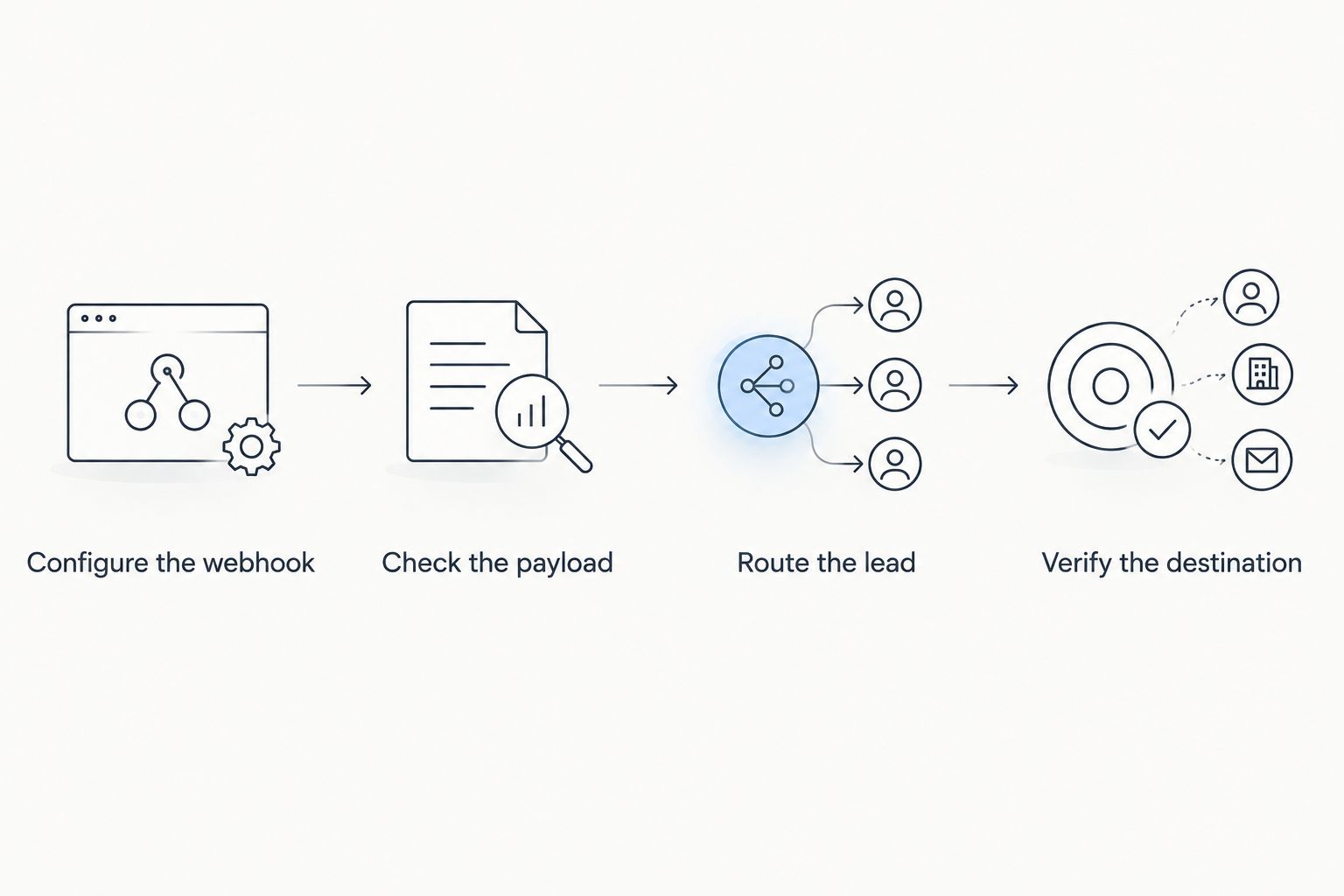
Route a lead when an answer changes
Some experiences allow a person to return and change an answer. An answer update is a different event from a completed submission. Use this variant only when the gamification platform exposes answer updates and the destination can identify the existing record.
- Confirm which event the platform sends for an updated answer. If it sends the full submission again, check whether the identifier remains the same; if it sends only the changed answer, identify how the remaining record fields reach Zapier.
- Create a separate Zap for the update event, or adjust the existing workflow only if its trigger reliably receives both event types with a distinguishing field.
- Filter the update to records that meet the campaign's consent and identification rules. Find the existing destination record using an identifier the destination actually supports.
- Update the routing field and any assignment based on the changed answer. Test with a record already in the destination, then confirm the existing record changed rather than assuming the action prevented a duplicate.
Expected result: an eligible answer change updates the intended lead; it does not create an unrelated record. If the source has no update event or stable way to identify the person, keep the completed-submission workflow and handle corrections through the campaign's established record process.
This distinction matters in 2026 campaigns with reusable interactive experiences. A workflow that treats every event as a new lead can misstate both the person's current interest and the team's follow-up queue.
Troubleshooting
- Zapier receives no test submission. Confirm that Catch Hook is selected, the copied URL is exact, and the platform is configured to send the completed-submission event. Submit a new test after saving the platform setting; an earlier submission will not test the new destination.
- The request arrives, but the filter stops a valid lead. Inspect the received consent value and routing answer in the trigger sample. Match the condition to that value's actual format, then retest with an eligible record and an ineligible record.
- The destination record has empty fields. Reopen the action's field mapping and select fields from the current trigger sample. Test a submission that fills in the relevant answers; a sample with blanks cannot confirm a complete mapping.
- One person appears as multiple leads. Check whether the destination action always creates a record and whether the source sends repeat submissions. Use an existing-record action or lookup only when the destination supports the identifier and the campaign calls for updates.
- Leads land in the wrong branch. Compare each Paths by Zapier condition with the value Zapier received, not just the answer text shown to the entrant. Give unmatched but eligible submissions a defined review destination.
After each fix, inspect the destination record. In 2026, a Zap history entry confirms that an action ran; it does not confirm that the right team received a usable lead.
Customize your workflow
Once the basic route works, add fields for the campaign or quiz source so the receiving team can distinguish one interactive experience from another. Use values supplied by the source or assigned in the workflow; do not infer a campaign from a person's answer.
Separate operational routing from measurement. A CRM record helps a team act on a consented lead, while an analytics event answers whether people completed the experience. Those are different destinations and need different field checks. Keep personal data out of analytics actions unless the receiving system and your approved data policy permit it.
For Brainylab gamification work, specify the handoff as part of the experience brief: which event fires, which answers affect routing, what permission is required, and who owns an unmatched lead. The 2026 readiness check is a short test set: a consented lead, a rejected lead, and a lead with an unexpected routing answer. Each should have a deliberate outcome.
FAQ
How do you connect a gamification platform to Zapier?
Use a submission webhook with Webhooks by Zapier's Catch Hook trigger if the platform supports outgoing webhooks. Send a test submission, inspect its fields, then filter and map eligible leads to a destination.
Does Brainylab have a native Zapier integration?
The supplied information does not establish a native Zapier integration for Brainylab. Confirm the handoff available for the specific gamified experience before choosing a native trigger, webhook, or export workflow.
What data should a quiz send to Zapier for lead routing?
Send the agreed contact identifier, the answer used for routing, and the relevant consent value. Include a submission identifier when available and needed to distinguish updates from new records.
Can Zapier route different quiz answers to different teams?
Yes, Paths by Zapier can apply separate conditions to received answer values and run different actions. Test every configured path and define how to handle eligible answers that match none of them.
Why is my gamification webhook not triggering Zapier?
Check the saved webhook URL and whether the platform sends the event on completed submission. Send a fresh test after saving the setting, then use Test trigger to inspect the request.
How do I prevent duplicate quiz leads?
Choose a destination action that can find or update an existing record when the destination and campaign rules support it. Test a repeat submission and verify the resulting record in the destination.
Can I route quiz leads without collecting consent?
A routing workflow cannot create permission that the experience did not collect. Define which submissions qualify for follow-up and filter against the actual permission data before creating actionable leads.
One last thing
Test the lead that should not arrive. A successful submission proves that data can move; a rejected submission proves that the consent gate can stop it. For Brainylab gamification projects, make that negative test part of the 2026 launch check, not an afterthought.