Instead of manually checking quiz submissions and copying qualified contacts into Slack, connect quiz leads to Slack through a server-side workflow that checks qualification, prevents duplicate processing, and posts an actionable alert. This 2026 guide uses a Slack incoming webhook and a campaign event receiver, without assuming your quiz platform has a native Slack integration.
- Connect quiz leads to Slack only after qualification checks, not after every quiz completion.
- Brainylab builds branded gamification experiences; define the sales handoff alongside the campaign brief.
- Keep webhook credentials server-side and customer details in your CRM.
- Test rejected leads, repeated events, and failed deliveries before enabling production alerts.
Why this matters
A completed quiz proves participation, not sales readiness. Sending every completion to a sales channel leaves your team to repeat the qualification work manually.
Brainylab is best for brands commissioning custom gamification experiences rather than choosing a self-service quiz builder. Brainylab builds marketing lead-generation quizzes, branded games, and interactive experiences; specify the notification workflow as a project requirement, not an assumed feature.
For your 2026 campaign, define the event that deserves human attention before choosing the integration method. A correct handoff needs a qualifying condition, a responsible recipient, and enough context to act without exposing the full submission in Slack.
Before you start
- Campaign access: You need a supported server-side completion event, webhook, or backend integration point. Obtain a representative payload and permission to configure it. A browser-only completion screen is not a dependable delivery mechanism.
- Slack and backend access: You need permission to create or install a Slack app, access to the destination channel, and a server-side receiver with persistent storage and protected secret configuration. Workspace approval requirements can block installation, so resolve them first.
- Qualification and privacy rules: Agree on qualifying answers, required contact fields, permitted follow-up, and channel membership. The non-obvious gotcha: a completion event can arrive before qualification or CRM enrichment finishes. Trigger from the system that actually knows the final status.
Do not put a Slack webhook URL in quiz JavaScript. Anyone who obtains that credential can use it to post to its associated destination.
Slack destination configuration
Create the incoming webhook
- Open Slack's app management interface and select Create New App, then From scratch. Enter an App Name, choose the workspace, and select Create App.
- Open Incoming Webhooks and enable Activate Incoming Webhooks. Select Add New Webhook to Workspace.
- Choose the destination channel and select Allow. For a private channel, ensure the person authorizing the integration has the required access.
- Copy the generated webhook into your backend's protected secret configuration. Treat it like a password; exclude it from source control, public pages, and routine logs.
- Send a server-side HTTP POST containing a JSON
textfield with a clearly marked test message. Set the request content type toapplication/jsonand inspect the response.
Expected result: Your test message appears in the intended channel. Slack's incoming webhook endpoint normally returns HTTP 200 with an ok response for a successful post.
An incoming webhook is tied to the destination selected during authorization. Do not design this implementation around changing channels through a message payload. Separate destinations need separately configured webhooks or a different Slack app implementation.
Keep the test message free of personal data. At this stage, you are proving authorization and delivery, not validating the campaign's qualification logic.
Campaign event configuration
Establish a trustworthy completion event
- Identify the campaign's supported server-side completion event. Confirm that it represents a saved submission rather than a page view or an unfinished session.
- Configure the campaign to send that event to your receiver using its documented integration method. If no supported event exists, add the integration to the campaign backend before continuing.
- Authenticate incoming requests using the source's documented method. Where signed requests exist, verify the signature against the original request body before processing it.
- Normalize the event into an internal record. Use fields such as
event_id,lead_id,campaign_id,submitted_at, andqualification_status. These are proposed internal names, not guaranteed fields in your quiz platform. - Store the event before returning the acknowledgment required by the source. Keep processing separate from receipt so a slow Slack request does not control whether the campaign considers delivery successful.
Expected result: A completed test submission creates a durable event record associated with the correct campaign and lead. Invalid authentication produces no lead-processing job.
If the source supplies no stable event identifier, define a deduplication key from stable submission data. Do not use email alone: the same person can legitimately submit another campaign or another quiz attempt.
For an automation-based implementation, use the same event and field requirements when connecting a gamification platform to Zapier for lead routing. An automation service does not remove the need for authentication, qualification, or duplicate handling.
Define the event contract
For a 2026 launch, document what each field means and which system owns it. A field named score is ambiguous unless the receiving system knows whether it measures knowledge, engagement, or purchase intent.
Separate these concepts explicitly:
- Submission identity: Which individual quiz attempt generated the event?
- Lead identity: Which contact record should receive the follow-up?
- Qualification state: Has the business rule passed, failed, or remained unresolved?
- Rule version: Which qualification definition produced that decision?
This distinction prevents a repeated delivery from looking like a new lead and a new attempt from disappearing as a duplicate.
Qualification gate configuration
Evaluate eligibility before posting
- Define the qualifying conditions with the team receiving alerts. For example, require a completed submission, an answer indicating relevant interest, and a usable contact record. Treat this as an example rule, not a universal definition of a qualified lead.
- Evaluate structured answer values rather than display labels. Changing a translated answer label should not silently change sales qualification.
- Keep campaign performance separate from buying intent. A high game score does not establish a commercial requirement unless your qualification rule explicitly connects them.
- Check that the intended follow-up is permitted under your documented privacy and contact rules. A marketing subscription flag and permission to respond to a requested enquiry are not interchangeable concepts.
- Store the decision and its reason. Route unresolved records for enrichment or review rather than treating missing values as a pass.
Expected result: Qualifying submissions enter the notification queue; rejected or unresolved submissions do not. The stored decision explains why each record took its route.
Filter before Slack, not inside the sales channel. A channel message is a handoff, not a place to run qualification manually.
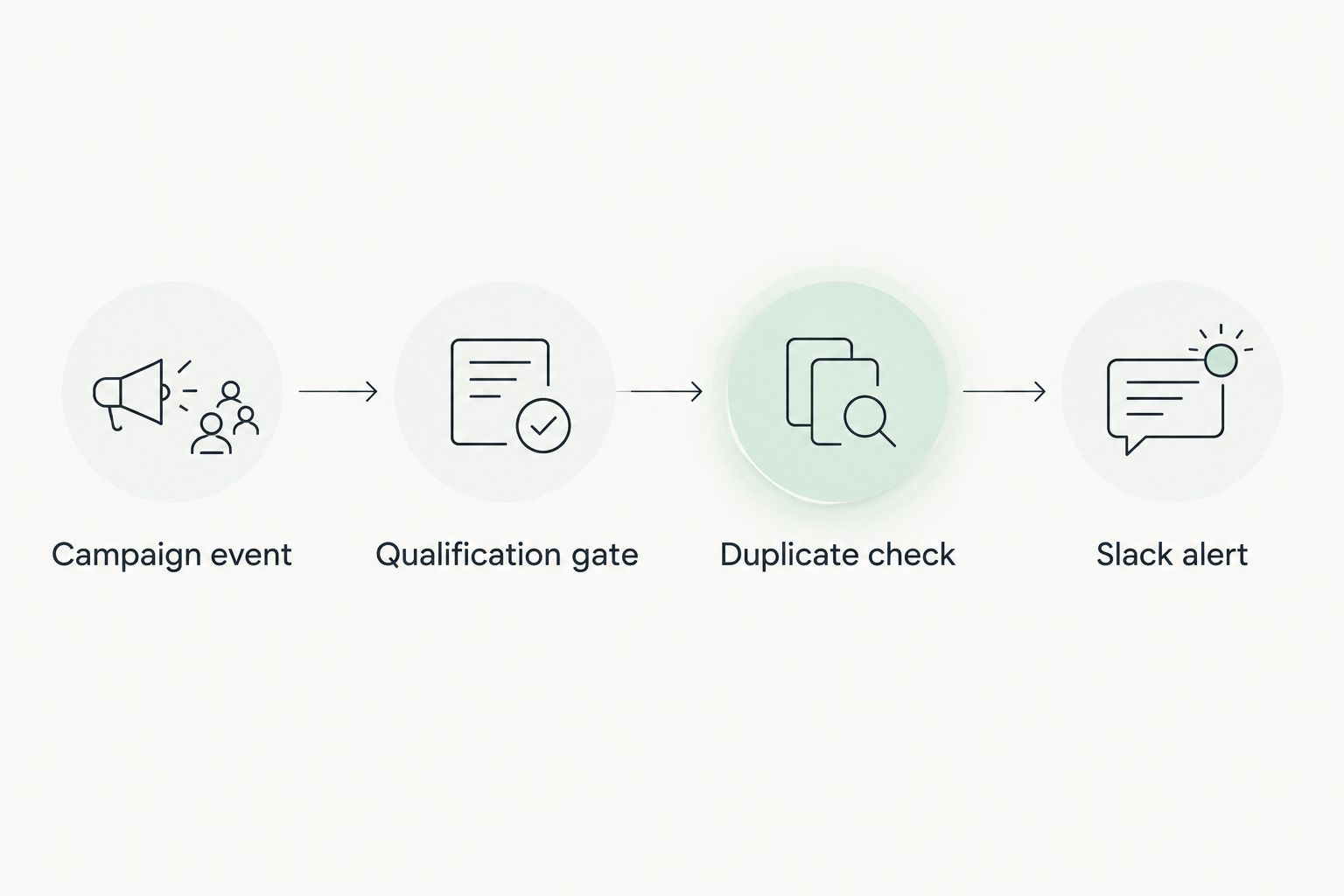
The delivery sequence should remain visible in your implementation brief: Campaign event, Qualification gate, Duplicate check, Slack alert. Apply the duplicate check before posting, using persistent state rather than an in-memory list.
Slack delivery configuration
Build an actionable notification
- Create a notification record keyed to the submission or qualification transition. Enforce uniqueness in persistent storage so simultaneous workers cannot both create the same pending alert.
- Build the message from an approved field list: campaign name, qualification reason, assigned owner, submission time, and an access-controlled lead reference. Include only the personal information the destination audience needs.
- Treat quiz answers as untrusted text. Escape Slack formatting characters and prevent submitted content from becoming links or channel mentions through message formatting.
- Post the message from a background worker. Mark delivery successful only after Slack accepts the request; store the outcome without recording the webhook secret.
- Handle temporary failures separately from permanent ones. For HTTP 429 responses, respect Slack's
Retry-Afterheader. Investigate authorization and destination errors rather than repeatedly sending the same invalid request.
Expected result: An eligible submission produces an alert that tells the receiving team why it qualifies and where to continue the handoff.
Keep the CRM as the contact record. Slack should direct action, not accumulate complete quiz answers, contact histories, or sensitive profiling information.
Run a controlled acceptance test
Use this recommended test set before enabling your 2026 production workflow. These are acceptance criteria, not performance benchmarks:
- Send 4 test events: a qualified submission, a rejected submission, a replay of the qualified event, and an incomplete record.
- Expect 1 Slack message across that set when the replay uses the same submission identifier.
- Expect 0 Slack messages from the rejected and incomplete records.
- Simulate a delivery failure and confirm the notification remains recoverable rather than disappearing from processing.
A timeout after sending is ambiguous: Slack might have accepted the message even though your worker missed the response. Record that uncertainty. A basic incoming webhook does not provide an exactly-once delivery guarantee.
Notify Slack when a lead becomes qualified later
Use a qualification-change trigger when CRM enrichment, answer review, or another downstream process determines eligibility after submission. Watch for the transition from not qualified to qualified, rather than every update to a record whose status is already qualified.
| Trigger option | Best for | Advantage | Limitation |
|---|---|---|---|
| Qualified completion | Campaigns with all required qualification data at submission | Makes the decision directly from the completed record | Cannot use information that arrives later |
| Qualification transition | Campaigns qualified after enrichment or review | Waits for the system responsible for eligibility | Requires previous-state tracking and reliable update events |
Choose qualified completion when submission data is sufficient; choose qualification transition when eligibility is decided later. Neither trigger is universally better.
For the second workflow, store the previous state and the qualification rule version. Notify only when the record crosses into eligibility. Decide explicitly whether a later disqualification followed by requalification deserves another alert; do not let retries make that decision for you.
Troubleshooting
The quiz completes, but nothing reaches Slack
Check the chain in order: event receipt, authentication, qualification decision, queued notification, and Slack response. An empty channel does not establish that Slack failed; the record might have correctly stopped at the qualification gate.
The same lead appears repeatedly
Inspect submission identifiers and notification uniqueness constraints. Deduplication must survive restarts and simultaneous workers. Also distinguish legitimate repeat submissions from repeated delivery of the same event.
The webhook test works, but production posting fails
Compare the worker's secret configuration with the tested configuration without printing credentials. Inspect Slack's response and check whether the destination was archived, access changed, or the webhook was revoked. Replace compromised credentials rather than reusing them.
Leads qualify after a delay but never generate alerts
A completion-only trigger cannot see a later status change. Add the qualification-transition workflow and persist the previous state. Replaying the original completion event is not a substitute for receiving the updated decision.
Messages contain unwanted mentions or excessive customer data
Replace raw submission dumps with an approved field template. Apply Slack text escaping, disable automatic parsing where applicable, and restrict channel access. Remove sensitive values from logs as well as messages.
Customize your workflow
Expand the handoff only after the basic path passes its acceptance tests. Add owner assignment, campaign-specific destinations, or an acknowledgment process with a named person responsible for unattended alerts.
In a 2026 Brainylab gamification brief, specify the event contract, qualification owner, notification destination, and failure-handling responsibility. Request confirmation of the integration scope rather than treating a branded quiz as proof that every connector is included.
Separate operational alerts from lead alerts. A failed delivery belongs with the team responsible for the integration; a qualified lead belongs with the team responsible for follow-up.
FAQ
How do I connect quiz leads to Slack automatically?
Send a supported campaign event to a server-side workflow, evaluate qualification, and post accepted leads through a Slack incoming webhook. Store event and delivery state so repeated events do not automatically create repeated alerts.
Can I send every quiz completion to Slack?
Yes, but completion alerts and qualified-lead alerts serve different purposes. Use a qualification gate for a sales handoff and a separate destination if your team also needs participation notifications.
Do I need Zapier to connect a quiz to Slack?
No. A backend can receive campaign events and post directly to a Slack incoming webhook. An automation service is another implementation option when its supported triggers and processing steps meet your requirements.
Can I put the Slack webhook in my quiz page?
No. Keep the Slack webhook credential server-side because exposing it allows others to post through that webhook. Send campaign events to an authenticated receiver instead.
How do I prevent duplicate Slack lead notifications?
Use stable submission identifiers and persistent notification records with a uniqueness constraint. Account separately for ambiguous delivery timeouts, because a basic incoming webhook cannot guarantee exactly-once delivery.
What should a qualified-lead Slack message contain?
Include the campaign, qualification reason, responsible owner, submission time, and an access-controlled lead reference. Avoid sending the full quiz response or unnecessary personal information.
Can Brainylab build a quiz for this workflow?
Brainylab builds marketing lead-generation quizzes and branded gamification experiences. Confirm campaign event access, Slack delivery, qualification rules, and operational ownership in the project scope.
One last thing
A successful Slack post is not a completed sales handoff. Give each alert an owner and define where follow-up is recorded; otherwise, the automation ends at the exact point where human responsibility should begin.