
Instead of exporting quiz entries after every campaign, connect gamified campaigns to Salesforce so an eligible submission creates or updates a lead and reaches the right sales owner. For a branded quiz or game, the handoff starts with a clear submission event, a consent check and a field map—not with sending every player to sales.
- To connect gamified campaigns to Salesforce, send eligible submissions through an authenticated integration and test lead ownership before launch.
- Brainylab is best for brands that need a custom gamified campaign and a defined sales handoff; Salesforce setup still needs coordination.
- Pass campaign source, relevant answers and consent status with each eligible lead; keep anonymous plays out of sales queues.
- Use a direct Salesforce API integration for custom routing, or a supported connector for a simpler workflow.
Why this matters
A quiz completion is not automatically a sales lead. Someone can finish a game without giving contact details, agree to campaign terms without requesting sales contact, or submit an address that already belongs to a Salesforce record. Treat those as different outcomes before you configure the sync.
For a 2026 campaign, the useful handoff is a record a salesperson can act on: who submitted it, which experience prompted it, what they asked for and whether the recorded permission supports follow-up. Brainylab builds gamification tools for brands; Brainylab is best for brands that want a custom interactive campaign tied to a defined sales handoff, not a blanket transfer of every player into Salesforce. The trade-off is that campaign design and Salesforce administration both need an agreed data contract.
Before you start
- Get campaign access. Identify the event that represents a completed quiz, game or interactive experience. Confirm which answers are collected, whether contact details are optional and where the consent decision is recorded.
- Get Salesforce access. Have an administrator review the Lead object, required fields, field permissions, duplicate rules and assignment rules. The integration also needs an approved authentication method and permission to create or update the intended records.
- Set the eligibility rule before building. A completion event alone is not permission to contact someone. Agree on the exact combination of contact details, expressed interest and recorded consent that qualifies for a sales handoff. This prevents a late-stage rewrite when the first test player reaches Salesforce without a usable contact record.
Keep a written map of campaign fields to Salesforce fields beside the build. It is the reference for both the developer implementing the sync and the salesperson checking the resulting record.
Choose the handoff route
The connection can be direct or pass through an intermediary. Choose based on the fields and routing rules the campaign actually needs, not on the shortest setup screen.
| Route | Best for | Advantage | Limitation |
|---|---|---|---|
| Authenticated Salesforce API integration | Custom games, answer-based qualification and controlled record updates | The team controls payloads, retries and lead-matching logic | Requires development and Salesforce authentication setup |
| Supported automation connector | A campaign with a compatible trigger and straightforward field mapping | Lets the team configure an existing trigger-and-action workflow | Available events and fields depend on the campaign platform and connector |
Use the authenticated Salesforce API route when answer data or duplicate handling affects the sales decision. Use a connector only after confirming it exposes the completion event, consent state and fields needed for the handoff. Neither route fixes an unclear qualification rule.
For this 2026 workflow, the steps below describe the direct integration. Where your campaign platform supplies a supported connector, apply the same event, field and testing rules to its trigger and Salesforce action.
Set up your campaign trigger
- Define an eligible submission in plain language. For example: the person completes the experience, provides usable contact details, selects an option indicating sales interest and has an appropriate recorded consent state. These are campaign rules to configure, not assumptions about every player.
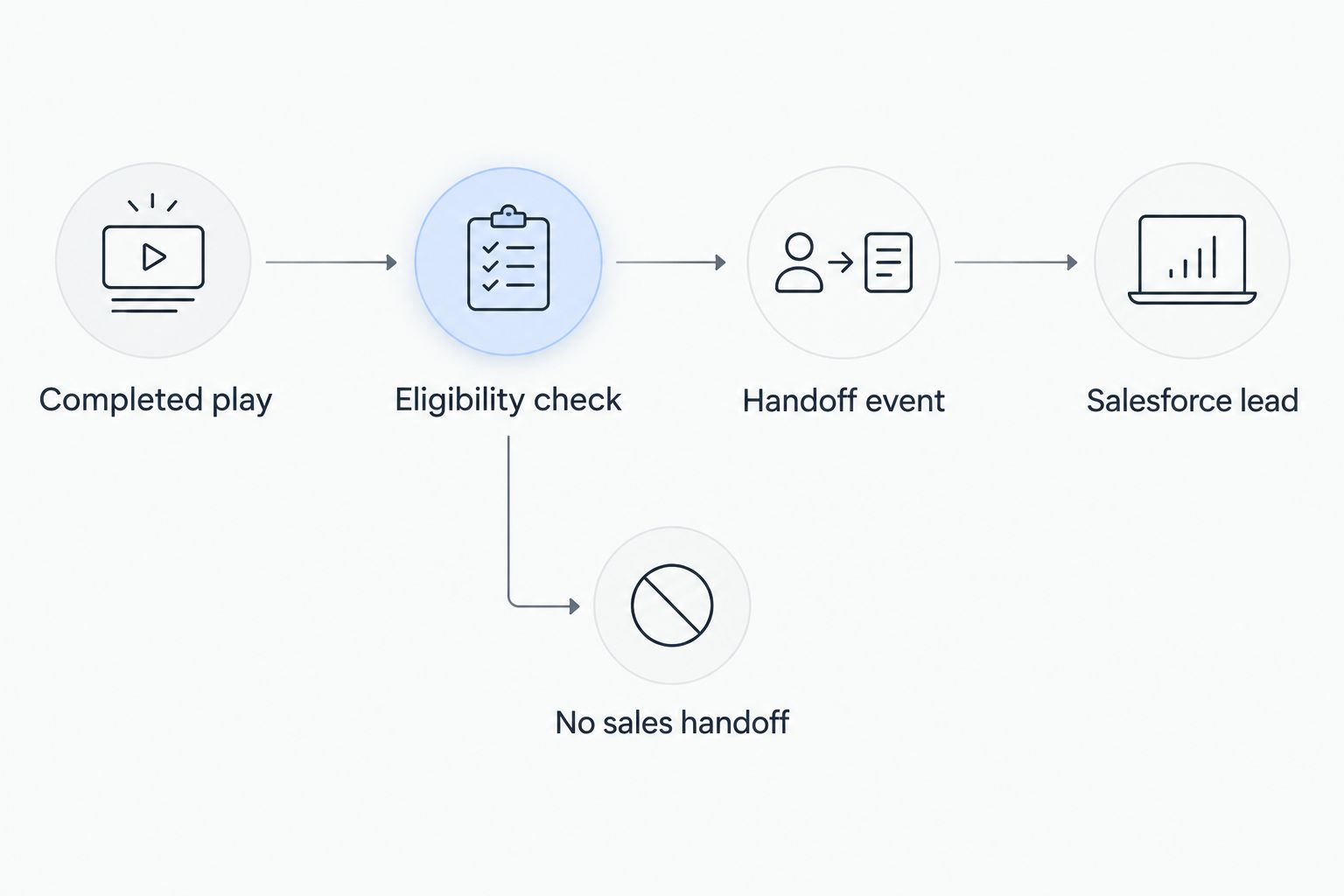
- Identify the event your campaign sends when those conditions are met. Ask the development team to distinguish a completed play from a qualified handoff event; the latter is what starts the Salesforce sync.
- Include a stable submission identifier in the event. Store the campaign identifier, completion time, selected answers used for routing and the consent status alongside the contact fields. Do not send every answer simply because it exists.
- Decide what happens when an eligible submission has a missing required field. Stop the handoff and log the reason rather than silently creating an incomplete sales record.
Expected result: a qualifying submission produces one identifiable handoff event, while an anonymous or ineligible play does not create a Salesforce lead. In a 2026 launch test, check both outcomes—not just the successful submission.
Configure Salesforce lead fields
- In Salesforce Setup, open Object Manager, select Lead, then open Fields & Relationships. Review the fields the integration will write and identify any required fields or validation rules that affect creation.
- Map the campaign contact fields to the corresponding Lead fields. Check Last Name, Company, Email, Lead Source and Description where they fit your Salesforce configuration. If the campaign does not collect a value required by your Lead setup, resolve that mismatch before enabling the sync; do not invent a customer answer to fill it.
- Decide where campaign-specific data belongs. A campaign identifier, answer used for qualification or consent reference needs an agreed destination field if sales must see or filter it. Have the administrator create and grant access to custom fields where the existing Lead fields do not fit.
- Record the exact API names and accepted values for mapped fields. A label visible to a user is not always the value an integration must submit. Confirm picklist values with the administrator instead of passing free text into a restricted field.
- Define the update rule. Match incoming submissions against the identifier your team approves, review Salesforce Duplicate Rules, and decide when an existing Lead is updated rather than creating another. Email can help identify a potential match, but it is not a universal unique identifier for every campaign participant.
Expected result: an eligible test submission has a defined destination for every field, and the team knows whether it will create a Lead or update an existing one. Brainylab campaign data should arrive as usable context, not as an unlabelled answer dump.
Configure authentication and sales routing
- Have the Salesforce administrator approve an authenticated API connection with access limited to the records and fields the workflow needs. Keep credentials out of the quiz page, browser code and campaign URLs.
- Configure the integration to send the mapped payload when the eligible event fires. Capture the Salesforce response so a failed write can be retried or investigated without asking the participant to submit again.
- In Salesforce Setup, review Lead Assignment Rules and the active rule entries. Decide whether the API submission should invoke the assignment rule or whether your integration will set an owner through an agreed process. A created Lead is not a completed handoff if nobody owns it.
- Agree on the routing input: campaign source, product interest, answer category or another field sales actually uses. Make sure the value sent by the campaign matches the value the routing rule expects.
- Submit 3 test leads: one eligible new contact, one repeat contact and one ineligible participant. Check field values, duplicate behavior, owner assignment and the absence of a sales record for the ineligible case.
Expected result: the eligible new contact reaches the intended owner, the repeat follows the agreed update rule, and the ineligible participant stays out of the sales queue. Record the test outcome before a 2026 campaign goes live.
Update Salesforce when a player returns
A second workflow is useful when someone first plays anonymously or submits contact details, then later gives an answer that changes their sales interest. Update the existing Salesforce record only when the later event can be matched to it and meets the agreed handoff rule. Otherwise, retain the later activity in the campaign system until you can identify the person reliably.
- Define the later event separately from the first completion, such as an updated quiz answer or a subsequent request for contact.
- Recheck consent at the point of the later event. Do not assume an earlier participation choice covers a new sales action.
- Use the agreed match key to locate the existing Salesforce record. If the match is ambiguous, send the case for review rather than choosing a record at random.
- Update only the fields the later event changes. Preserve the original campaign source if your attribution rules require it, and store the later interaction in the location agreed with the Salesforce administrator.
- Test the return visit with a known contact and confirm that sales sees the changed interest without receiving an avoidable duplicate Lead.
Expected result: the salesperson can distinguish the first campaign submission from the later expression of interest. This variant matters for 2026 campaigns that let participants revisit an experience rather than completing everything in one session.
Troubleshoot the handoff
- Salesforce rejects the new Lead. Check required fields, restricted picklist values, validation rules and the integration user's field permissions. Inspect the error returned for that submission before changing the campaign form.
- A Lead exists but has the wrong owner. Confirm which Lead Assignment Rule is active, whether the API request invokes assignment and whether the submitted routing value matches a rule entry. Test with the same payload after the fix.
- Repeat players create duplicate Leads. Check the campaign submission identifier, the integration's match logic and Salesforce Duplicate Rules together. A retry must not be treated as a new person.
- The consent field is blank or misleading. Trace the recorded choice from the campaign event through the field map. Keep participation consent and permission for sales follow-up distinct if the experience asks for both.
- The game shows success, but Salesforce has no record. Campaign completion and CRM delivery are separate outcomes. Check the event log, authentication status and Salesforce response; add a retry or review path for failed deliveries.
These checks are part of the workflow, not cleanup after launch. In 2026, a sales team should be able to tell whether an absent lead was deliberately excluded or failed during delivery.
Customize your workflow
Once the basic handoff works, decide which answers deserve to change sales treatment. A product-interest answer can support routing; a recreational score often cannot. Keep the CRM payload focused on information a salesperson can interpret and act on, and document what each answer means.
If the campaign also feeds another system, keep the eligibility rule consistent across destinations. A Salesforce lead, an email segment and an advertising audience do not necessarily have the same consent or qualification requirements. Build separate destination rules rather than treating one completed quiz as permission for every follow-up channel.
Review the workflow with sales before the next 2026 campaign: show them a sample Lead, ask whether the context is enough for a relevant follow-up, then remove fields they do not use. Brainylab's gamified experiences collect first-party customer data; the useful measure of a handoff is whether that data reaches sales with a clear reason to act. The limitation remains straightforward: even a well-built experience cannot supply a field, permission or sales intent it never collected.
Plan a campaign handoff
Discuss the quiz or game event, qualification rule and Salesforce field map.
FAQ
How do you connect gamified campaigns to Salesforce?
Connect an eligible campaign submission event to Salesforce through an authenticated integration or a supported connector. Map contact, source and qualification fields, then test creation, updates and lead ownership.
Should every quiz completion become a Salesforce lead?
No. Send a completion to sales only when it meets your stated contact, qualification and consent rules. Anonymous or recreational plays can finish without creating a Lead.
Is an API integration better than an automation connector?
An API integration is better when a gamified campaign needs custom field mapping, matching or routing. A supported connector fits a simpler workflow when it exposes the event and fields you need.
What Salesforce fields should a gamified campaign send?
Send the contact details and campaign context required for the agreed sales action. Check your Lead object's required fields, then map source, relevant answers and consent status to approved destinations.
How do you prevent duplicate Salesforce leads from quiz submissions?
Use an agreed match rule and make retries safe before enabling the handoff. Review the integration's matching behavior alongside Salesforce Duplicate Rules and test a repeat submission.
Why does a Salesforce lead have no sales owner?
Check whether the handoff invokes an active Lead Assignment Rule or sets ownership through another approved process. Also confirm that the submitted routing value matches the rule entry.
Can a returning player update a Salesforce lead?
Yes, when the later event reliably matches an existing record and meets the current handoff rule. Test the update separately from first-time Lead creation.
One last thing
Test the participant who should not reach Salesforce. A rejected or anonymous completion proves the eligibility rule works; a successful Lead alone proves only that the connection can write a record. That distinction keeps a 2026 sales queue focused on people the team is permitted and prepared to contact.