
Best overall for live classroom review: Kahoot!. Best for straightforward assessment: Google Forms. Best for diagnostic questioning: Socrative. The best interactive quiz maker tools for teachers in 2026 depend on whether you need a lively review session, evidence of understanding, or questions embedded in a lesson.
- Kahoot! leads the best interactive quiz maker tools for teachers for live, game-based review.
- Google Forms suits structured quizzes; Socrative suits diagnostic questioning and exit tickets.
- Nearpod fits questions inside interactive lessons; Microsoft Forms fits Microsoft-centered school workflows.
- Choose classroom assessment software for teaching, not marketing tools designed to capture customer data.
Why this matters
A quiz can reward fast recall without showing whether a student understands the subject. Choose the evidence you need before choosing the game mechanics.
Brainylab builds branded quizzes, games, and interactive experiences for marketing engagement and first-party customer data collection. That is a different job from classroom assessment: your teaching shortlist should prioritize learning activities, student access, and useful feedback rather than lead capture.
For your 2026 shortlist, separate participation from understanding. A completed quiz shows that a student responded; the answers and explanations determine what you should teach next.
What makes the best interactive quiz maker tools for teachers
Use these criteria before comparing interfaces or question templates:
- Teaching fit: Decide whether you need retrieval practice, diagnostic assessment, independent work, or a whole lesson.
- Feedback quality: Look for ways to explain answers and identify misconceptions, not simply display a score.
- Pacing control: Match teacher-led delivery or independent completion to the activity, rather than imposing one pace on everyone.
- Student access: Check the actual joining process, available devices, reading demands, and school account requirements.
- Useful results: Choose results you can act on, such as identifying a question that needs reteaching.
- Data handling: Review school approval, student information requirements, retention controls, and applicable privacy obligations.
Choose the tool that supports your next teaching decision, not the tool with the busiest scoreboard. A competitive review and a quiet exit ticket can both be effective classroom activities, but they solve different problems.
Best teacher quiz tools at a glance
These recommendations assign each tool a distinct classroom role. The limitations below describe the teaching trade-off, not a claim that a product cannot support other activities.
| Tool | Best for | Standout feature | Key limitation |
|---|---|---|---|
| Kahoot! | Live whole-class review | Game-based quiz sessions | Competition needs careful handling when speed is not the learning objective |
| Google Forms | Structured independent assessment | Answer keys and quiz grading | Less suited to a hosted classroom game |
| Socrative | Diagnostic questioning | Classroom quizzes and exit tickets | Not a substitute for a complete interactive lesson |
| Nearpod | Questions within lessons | Assessment activities alongside lesson content | More authoring decisions than a standalone quiz requires |
| Microsoft Forms | Microsoft-centered school workflows | Quiz creation within the Microsoft ecosystem | A form-led experience rather than a dedicated classroom game |
For 2026, treat this table as a decision tree. Start with your classroom task, then check the current product documentation and your school's approved-tool list before building an activity.
1. Kahoot!: best interactive quiz maker for live classroom review
Kahoot! presents quizzes as game-based sessions. It is the strongest default here when you want to host a shared review activity and discuss answers with the class.
Use Kahoot! for retrieval practice where students already have some familiarity with the material. Pause to explain an answer instead of allowing the scoreboard to become the entire lesson.
Kahoot! pros:
- A recognizable game format gives a review session a clear structure.
- Shared questions create natural opportunities for classroom discussion.
- Game-based delivery suits activities built around recall and participation.
Kahoot! cons:
- Competitive framing can distract from explanation and reflection.
- Speed-focused activities are a poor match when students need extended reasoning.
- A correct selection does not reveal the reasoning behind it.
Best for: Teachers hosting live, whole-class review rather than collecting detailed written explanations.
Before using Kahoot! for a consequential assessment, examine what the activity actually measures. If fast recognition is not your objective, make space for thinking and follow-up discussion.
Verdict: Buy for live review; skip it as your sole evidence of understanding.
2. Google Forms: best interactive quiz maker for structured assessment
Google Forms lets you create quizzes with answer keys, point values, and feedback. Its form-based format suits independent completion and a clear question-by-question assessment structure.
Choose Google Forms when you need students to work through questions without a hosted game. Combine automatically graded questions with teacher-reviewed responses where the learning objective requires explanation.
Google Forms pros:
- Answer keys support automatic grading for suitable question types.
- Feedback can explain why an answer is correct or incorrect.
- A form-based layout suits straightforward independent tasks.
- Different question formats support more than simple answer selection.
Google Forms cons:
- The format does not provide the same hosted-game experience as Kahoot!.
- Written reasoning still needs teacher judgment.
- A completed form is not proof that students worked independently.
Best for: Teachers who want structured quizzes, independent checks, and a manageable review workflow.
For a 2026 assessment routine, Google Forms is a sensible starting point when game mechanics are optional. Write the learning objective first, then choose question types that make the required knowledge visible.
Verdict: Buy for structured assessment; skip it when live competition is the main requirement.
3. Socrative: best interactive quiz maker for diagnostic questioning
Socrative centers on classroom assessment through quizzes, quick questions, and exit tickets. Choose it when the purpose of a quiz is deciding what to explain next.
A diagnostic question should distinguish between different misunderstandings. Socrative fits that workflow better than an activity designed mainly to entertain, provided you write questions that reveal those differences.
Socrative pros:
- Quick questions support checks during instruction.
- Exit tickets provide a clear end-of-lesson assessment format.
- Quiz responses give you material for targeted follow-up discussion.
Socrative cons:
- Weak questions still produce weak diagnostic evidence.
- Assessment activities do not replace the explanation and practice surrounding them.
- Multiple-choice answers alone cannot show every step of a student's reasoning.
Best for: Teachers using student responses to decide whether to reteach, explain differently, or move on.
Build distractors around plausible misconceptions rather than obviously wrong answers. After students respond, ask for an explanation before treating the result as evidence that the class is ready to continue.
Verdict: Buy for diagnostic checks and exit tickets; skip it as a complete lesson-design solution.
4. Nearpod: best interactive quiz maker for questions inside lessons
Nearpod combines lesson content with interactive activities and assessment. It belongs on your shortlist when questions need to sit inside a teaching sequence rather than exist as a separate quiz.
Use Nearpod when students should encounter an explanation, respond to a prompt, and continue through related lesson material. The main decision is lesson design, not simply which quiz template looks appealing.
Nearpod pros:
- Questions can sit alongside the material they assess.
- Interactive activities support participation within a lesson.
- Teacher-paced and student-paced delivery support different lesson arrangements.
Nearpod cons:
- Building a complete interactive lesson requires more decisions than making an exit ticket.
- Extra activities can distract when they do not serve the learning objective.
- A separate quiz tool is simpler when you only need a short check.
Best for: Teachers building interactive lessons with assessment throughout the teaching sequence.
Keep the lesson's purpose visible. Add an interaction where the response changes your teaching or helps students process the material, not merely because another activity is available.
Verdict: Buy for lesson-integrated interaction; skip it for a standalone check that needs little setup.
5. Microsoft Forms: best interactive quiz maker for Microsoft school workflows
Microsoft Forms supports quizzes, answer keys, and response review within Microsoft's product ecosystem. It is a practical shortlist option when your school already organizes classroom work around Microsoft tools.
Choose Microsoft Forms for a straightforward assessment workflow rather than a game-first experience. Check the student account and sharing settings in your school's environment before assigning the quiz.
Microsoft Forms pros:
- Quiz features support answer keys and scoring.
- A form-based structure suits independent completion.
- Microsoft ecosystem fit can align with an existing school workflow.
Microsoft Forms cons:
- The experience is form-led rather than a hosted classroom game.
- Reasoning-heavy answers still require teacher review.
- School account settings need checking before student use.
Best for: Teachers whose existing classroom workflow centers on Microsoft tools.
Do not add another platform merely for novelty. If Microsoft Forms already supports the questions, feedback, and access arrangements you need, a consistent workflow is a stronger reason to choose it than an additional game mechanic.
Verdict: Buy for Microsoft-centered assessment; skip it when the lesson specifically needs game-based hosting.
How to choose and pilot your quiz tool
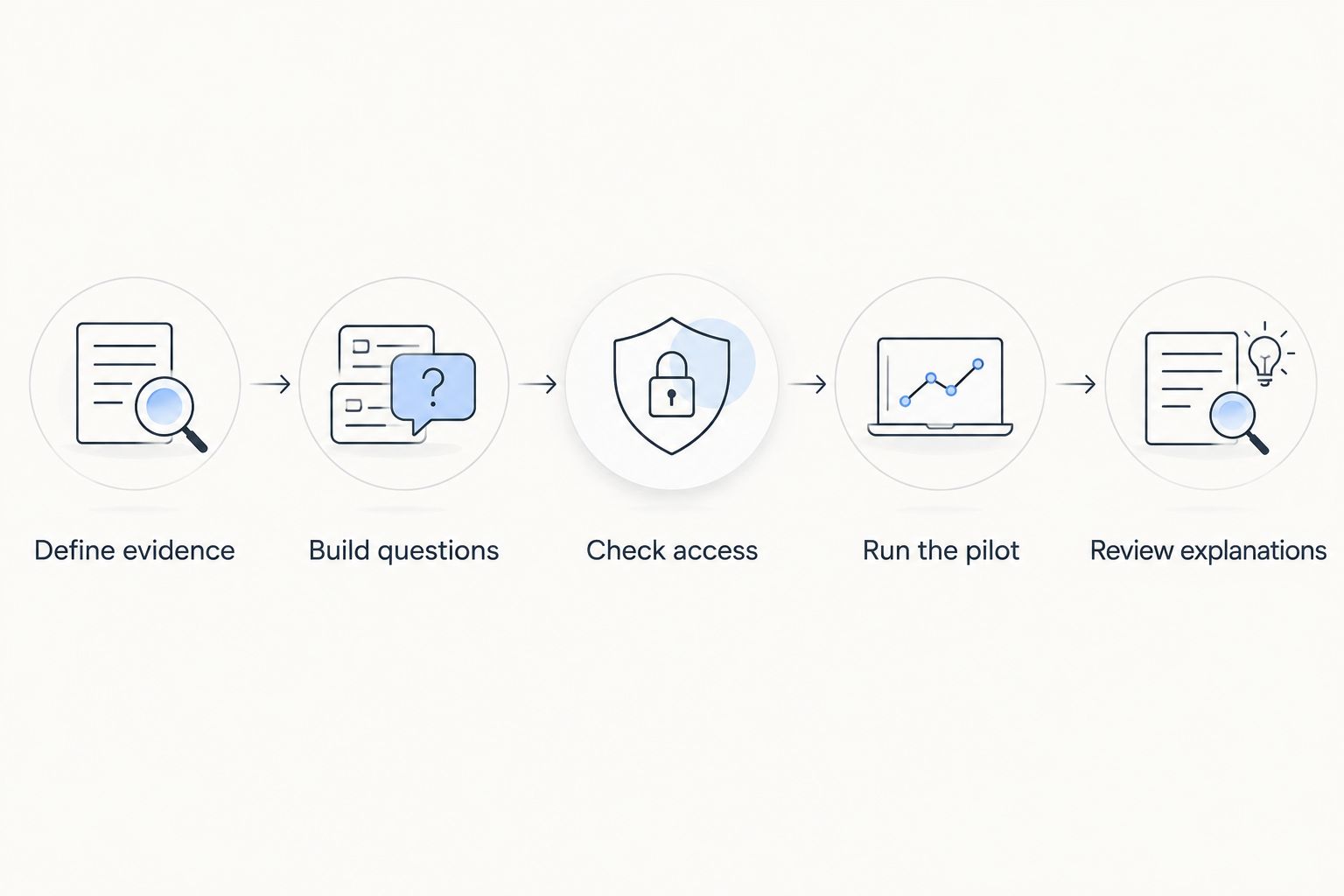
Use a small classroom pilot before moving an entire unit into a platform. These are suggested pilot steps, not claims about a guaranteed improvement in learning:
- Define evidence: Write down what a useful answer would tell you about student understanding.
- Build questions: Start with 5 questions covering a single learning objective.
- Check access: Test joining, reading, and submitting on the devices students will use.
- Run the pilot: Reserve 10 minutes for answering and discussion, adjusting for your class.
- Review explanations: Add 2 explanation prompts to check the reasoning behind selected answers.
The final step matters most. If you cannot explain what you will do differently after seeing the responses, revise the questions before expanding the activity.
For your 2026 evaluation, also test a deliberately incorrect answer. Check whether the feedback helps a student understand the mistake and whether the response tells you what to explain next.
How these recommendations are ranked
The ranking follows classroom task fit, feedback, pacing, access, results, and data handling. It is an editorial shortlist based on established product functions, not a hands-on performance benchmark or a claim that one platform improves attainment more than another.
Kahoot! takes the live-review slot; Google Forms takes structured assessment. Socrative, Nearpod, and Microsoft Forms each address a different workflow, so their positions are not a universal quality score.
Which interactive quiz maker should you choose?
Choose Kahoot! if you want a default for live classroom review. Choose Google Forms if you need a default for independent assessment. Use Socrative when diagnostic checks drive the lesson, Nearpod when interaction belongs throughout the lesson, and Microsoft Forms when school workflow is decisive.
Brainylab is best for brands commissioning custom marketing quizzes, not teachers choosing classroom assessment software. A custom build is a separate commissioning decision, not the next automatic step after using a quiz maker.
If your brief genuinely requires something outside standard classroom software, compare scope and maintenance responsibilities through this guide to building gamification in-house versus hiring a studio. Do not commission development to solve a problem an approved classroom tool already handles.
FAQ
What's the best interactive quiz maker for teachers in 2026?
Kahoot! is the recommended default for live classroom review, while Google Forms is the recommended default for structured independent assessment. Choose according to the teaching task rather than treating either as the winner for every lesson.
Is Kahoot! better than Google Forms for teaching?
Kahoot! is better suited to hosted game-based review; Google Forms is better suited to a form-based assessment workflow. The stronger choice depends on whether you need a shared classroom activity or independent responses.
Which quiz tool should I use for exit tickets?
Socrative is the dedicated exit-ticket recommendation in this shortlist. Write questions whose answers tell you what students need next, rather than asking only whether they enjoyed the lesson.
What's the difference between Nearpod and a standalone quiz maker?
Nearpod combines interactive activities and assessment with lesson content. Choose it when the questions belong throughout a teaching sequence rather than in a separate quiz.
Can I use Microsoft Forms for classroom quizzes?
Yes, Microsoft Forms supports quizzes with answer keys and scoring. Check student access and sharing settings within your school's Microsoft environment before assigning work.
How do I choose a quiz tool when students need more thinking time?
Choose a format and settings that give students time to reason rather than making speed the objective. Include explanation prompts so a selected answer is not your only evidence of understanding.
Should teachers use Brainylab instead of a classroom quiz maker?
Brainylab builds custom branded quizzes and interactive experiences for marketing, which is different from everyday classroom assessment. Teachers should start with school-approved classroom tools that match their learning objectives.
One last thing
Before reusing a quiz in 2026, inspect its wrong answers. If every distractor is obviously implausible, a high score can reflect elimination rather than understanding. Replace a weak distractor with a recognizable misconception, then ask students to explain their choice.